

Engineering Excellence
Observability, debugging, and maintaining code quality at scale
“You can’t manage what you can’t measure.”
Peter Drucker
I was brought in to fix a luxury apparel site. It was doing $20M a year. It was also painfully slow. The CTO had added 10 more servers. The site was still slow. The developers were blaming “traffic.”
I opened up the logs. I didn’t look at the traffic. I looked at the work.
I found a “Ghost Job.”
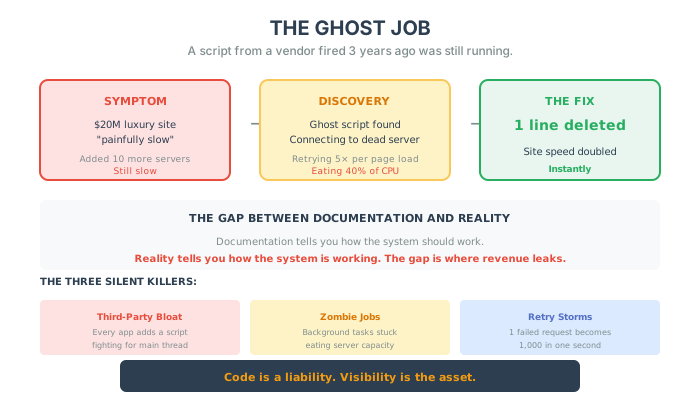
A script from a vendor they had fired 3 years ago was still running. Every time a customer loaded a product page, this script tried to connect to a dead server, timed out, and then retried 5 times.
It was eating 40% of their CPU.
We deleted one line of code. The site speed doubled instantly. We didn’t need more servers. We needed matches.
Documentation vs. Reality
Section titled “Documentation vs. Reality”If you ask a developer how the system works, they will show you the Documentation. They will show you a beautiful diagram. “Customer clicks here, API goes there.”
It is a lie.
Documentation tells you how the system should work. Reality tells you how the system is working.
The biggest revenue leaks in your business are living in the gap between the Diagram and the Reality. And the only way to see them is to stop trusting the docs and start watching the logs.
The “Observability” Mindset
Section titled “The “Observability” Mindset”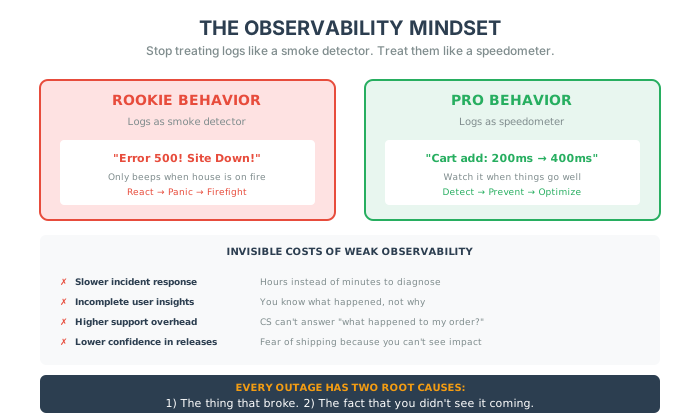
Most teams treat Logging like a smoke detector. It only beeps when the house is on fire. “Error 500! Site Down!”
This is rookie behavior.
You need to treat Logging like a speedometer. You need to be watching it when things are going well.
[Observability]: The ability to ask your system “Why?” and get an answer.
If you can’t answer “Why is checkout 0.5 seconds slower today than yesterday?” you are flying blind. And flying blind costs you 2% of revenue a day.
Logs That Tell a Story
Section titled “Logs That Tell a Story”The goal of observability isn’t to capture everything. It’s to tell a story.
When someone adds an item to their cart, do you know:
- The request payload and response code?
- The exact line where things broke?
- What device, connection, and browser they were using?
You should. Not just for debugging, but to understand why something works (or doesn’t).
We obsess over A/B testing and analytics. But the moment we need to trace a real user’s journey through the stack, we’re squinting at timestamps and grep’ing production logs like it’s 2009.
That’s not modern engineering. That’s guesswork in disguise.
Every Outage Has Two Root Causes
Section titled “Every Outage Has Two Root Causes”- The thing that broke.
- The fact that you didn’t see it coming.
If you care about uptime, you should care just as much about observability debt as you do about technical debt. Maybe more.
The biggest risks in e-commerce aren’t the bugs you know about. They’re the ones quietly killing your revenue at 2% a day, unnoticed, because you weren’t tracking the right signals.
The Invisible Costs of Weak Observability
Section titled “The Invisible Costs of Weak Observability”| Cost | Impact |
|---|---|
| Slower incident response | Hours instead of minutes to diagnose problems |
| Incomplete user insights | You know what happened, not why |
| Higher support overhead | CS team can’t answer “what happened to my order?” |
| Missed edge cases | Problems you never knew existed |
| Lower confidence in releases | Fear of shipping because you can’t see the impact |
All of which leads to a culture of fear around shipping—because if you can’t see what your code is doing, you’re always bracing for a surprise.
The Silent Killers
Section titled “The Silent Killers”Speed kills. But bloat is what kills speed. Here are the three things lurking in your code right now:
1. Third-Party Bloat (The Parasites) Every “App” you install adds a script. Analytics, Chatbots, Reviews, Retargeting. They all want to run on the “Main Thread.” They are fighting your customer for attention. The Fix: Audit your scripts. If an app doesn’t make you money today, delete it.
2. The “Zombie” Job Background tasks that process images, send emails, or sync inventory. Often, they get stuck. They retry. They pile up. They eat your server capacity while you sleep. The Fix: Monitor your “Queue Depth.” If it never hits zero, you have a zombie.
3. The Retry Storm An internal API fails. The system is designed to “Retry.” So it retries. And fails. And retries again. Suddenly, one failed request becomes 1,000 failed requests in one second. You accidentally DDOS yourself. The Fix: Exponential Backoff. (Tell your devs. They will know what it means).
The “Lights On” Protocol
Section titled “The “Lights On” Protocol”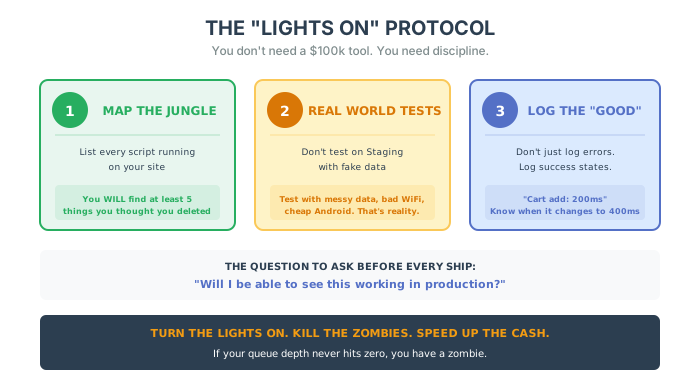
You don’t need a $100k tool to fix this. You need discipline.
1. Map the Jungle List every single script running on your site. You will find at least 5 things you thought you deleted. Kill them.
2. Real World Load Tests Don’t test on Staging with fake data. Test with messy data. Test with bad Wi-Fi. Test with a cheap Android phone. That is reality.
3. Log the “Good” Don’t just log errors. Log: “Customer added to cart in 200ms.” When that number changes to 400ms, you know you broke something—before the customer complains.
The Bottom Line
Section titled “The Bottom Line”Code is not an asset. Code is a liability. Every line of code you write is something you have to debug later. Visibility is the asset.
Turn the lights on. Kill the zombies. Speed up the cash.
Five things to do this week:
- Map the jungle – List every single script running on your site. You will find things you thought you deleted.
- Find the ghost jobs – Check your queue depth. If it never hits zero, you have a zombie.
- Log the good – Don’t just log errors. Log success states: “Customer added to cart in 200ms.” When that changes to 400ms, you’ll know you broke something.
- Test with reality – Don’t test on staging with clean data. Test with messy data, bad Wi-Fi, and a cheap Android phone.
- Ask the question – Before you ship your next feature: “Will I be able to see this working in production?”
In the next chapter, we are going to talk about the result of all this excellence: Performance & Speed. How to make your site so fast it feels like magic.