

Architecture & APIs
The backend decisions that scale
“Complexity is the enemy of execution.”
Tony Robbins
You ask your CTO to change the color of the “Buy” button. He looks at you, sighs, and says: “Well, we have to refactor the microservices mesh first. It’s going to take 3 weeks.”
3 weeks? To change a button?
You have fallen into the Engineering Trap. You built a Ferrari engine for a golf cart.
Most entrepreneurs treat technology like a religion. They hear buzzwords like “Headless,” “Microservices,” and “Composable,” and they think: “I need that to scale.”
No, you don’t. Architecture is not about code purity. It is about Speed to Market.
The Architecture Detection Protocol
Section titled “The Architecture Detection Protocol”Before you add any new technology, you need to know where your current stack is failing. Most teams add complexity to fix symptoms, not causes.
Step 1: The Speed-to-Deploy Audit
Section titled “Step 1: The Speed-to-Deploy Audit”Answer honestly:
| Question | Your Answer | 🚨 Red Flag If |
|---|---|---|
| How long to change a button color? | ___ hours/days | > 4 hours |
| How long to add a new product? | ___ hours | > 1 hour |
| How long to update pricing? | ___ hours | > 30 minutes |
| Can you deploy on Friday at 4 PM? | Yes / No | No |
| How many deploys last month? | ___ | < 4 per month |
🚨 Red Flag: If simple changes take days, you’ve over-engineered your stack.
Step 2: The Integration Fragility Audit
Section titled “Step 2: The Integration Fragility Audit”Map every external system connected to your store:
| System | Purpose | If It Fails… | 🚨 Red Flag If |
|---|---|---|---|
| Payment Gateway | Checkout | Site can’t take orders | |
| Inventory Sync | Stock levels | Overselling occurs | |
| Email/SMS | Marketing | Acceptable degradation | |
| Search | Product discovery | Users can’t find products | |
| Analytics | Tracking | Acceptable degradation |
🚨 Red Flag: If any non-critical system failure can crash your entire checkout, you have a coupling problem.
Step 3: The API Performance Audit
Section titled “Step 3: The API Performance Audit”Use Chrome DevTools or WebPageTest. For your product page, measure:
| Metric | Your Site | Benchmark | 🚨 Red Flag If |
|---|---|---|---|
| # of API calls | ___ | < 20 | > 50 |
| Total API response time | ___ ms | < 500ms | > 2000ms |
| Largest single payload | ___ KB | < 50KB | > 200KB |
| Failed requests | ___% | 0% | > 1% |
🚨 Red Flag: If you’re making 50+ API calls per page load, you’re creating your own bottleneck.
Step 4: The Tech Debt Reality Check
Section titled “Step 4: The Tech Debt Reality Check”Ask your development team:
| Question | Answer |
|---|---|
| How many “workarounds” are in production? | ___ |
| How many systems have no documentation? | ___ |
| How many integrations were built by someone who left? | ___ |
| What would break if Shopify updated tomorrow? | ___ |
🚨 Red Flag: Every “I don’t know” is a time bomb waiting to explode.
The 3-Tier Architecture Fix Framework
Section titled “The 3-Tier Architecture Fix Framework”Quick Fixes (This Week: 2-8 hours, 10-20% improvement)
Section titled “Quick Fixes (This Week: 2-8 hours, 10-20% improvement)”1. Enable API Response Caching
Most API responses don’t change every second. Cache them.
Cache-Control: public, max-age=300Time: 2-3 hours Expected lift: 30-50% reduction in API response times
2. Remove Unused Integrations
Audit your apps and integrations. Remove anything not actively providing value.
Every integration is a potential failure point.
Time: 2-4 hours Expected lift: Reduced complexity, fewer potential breakpoints
3. Add Fallback States for Non-Critical Systems
If your reviews system fails, the site should still work. Add graceful degradation.
Time: 2-4 hours Expected lift: 100% uptime even when non-critical systems fail
Medium Fixes (This Month: 1-4 weeks, 20-35% improvement)
Section titled “Medium Fixes (This Month: 1-4 weeks, 20-35% improvement)”1. Consolidate Redundant API Calls
Most sites make the same API call multiple times per page. Audit and consolidate.
Time: 1-2 weeks Expected lift: 20-40% reduction in API calls, faster page loads
2. Implement Async Processing for Non-Critical Operations
Inventory syncs, email triggers, and analytics shouldn’t block the user.
Move them to background queues.
Time: 2-3 weeks Expected lift: 15-25% faster checkout, better resilience
3. Add Proper Monitoring and Alerting
You should know about failures before customers do.
Set up monitoring for:
- API response times
- Error rates
- Third-party service health
Time: 1-2 weeks Expected lift: Faster incident response, less customer impact
Deep Fixes (This Quarter: 4-8 weeks, 30-50%+ improvement)
Section titled “Deep Fixes (This Quarter: 4-8 weeks, 30-50%+ improvement)”1. Migrate to the Modular Monolith Pattern
Start with a stable monolith. Extract only the pieces that need independent scaling.
Don’t go full headless unless you have the team to support it.
Time: 6-8 weeks Expected lift: Faster development, easier maintenance
2. Implement a Proper API Gateway
Centralize API management with rate limiting, caching, and monitoring.
Time: 4-6 weeks Expected lift: 25-40% improvement in API reliability
3. Build a Deployment Pipeline with Automated Testing
You should be able to deploy on Friday at 4 PM with confidence.
That requires:
- Automated tests
- Staging environments
- Rollback capability
Time: 6-8 weeks Expected lift: More frequent deploys, faster feature delivery
The API Layer: Your Invisible Revenue Killer
Section titled “The API Layer: Your Invisible Revenue Killer”Earlier this year, I was chatting with a director who runs a mid-sized e-commerce business doing 6-figures weekly.
Despite impressive sales growth, they noticed a troubling pattern:
- Page load times were creeping up
- Customer complaints were on the rise
- Cart abandonment was steadily increasing
After digging into the issue, the culprit was clear: their API layer wasn’t keeping up with their growth.
Think of your API layer as the nervous system of your e-commerce platform. It connects your front-end (what customers see) to the back-end (where the magic happens).
But here’s the catch: APIs don’t just work. They need to be designed, scaled, and optimized.
Symptoms of API Bottlenecks:
Section titled “Symptoms of API Bottlenecks:”1. Slow Page Load Times If your product pages take more than 2 seconds to load, it’s likely your API is overloaded or making too many inefficient calls.
2. Out-of-Sync Inventory Ever oversold a product because inventory updates lagged? That’s your API struggling to keep up.
3. Failed Transactions Payment API timeouts lead to lost revenue and furious customers.
The 3-Step API Fix
Section titled “The 3-Step API Fix”Step 1: Audit Your Current API Usage
Use tools like Postman or New Relic to monitor response times and identify slow endpoints.
Look for:
- Redundant API Calls: Are you fetching the same data multiple times?
- Large Payloads: Are you sending more data than needed?
- Frequent Timeouts: Which endpoints fail under load?
Step 2: Optimize and Cache Strategically
- Enable Caching: Reduce server load by caching frequent requests at the edge using a CDN.
- Batch API Calls: Combine multiple small requests into larger, fewer calls.
- Use Pagination: For large datasets, ensure your API supports pagination.
Pro Tip: Use GraphQL instead of REST for complex queries. It lets clients request only the data they need, reducing payload sizes.
Step 3: Scale for the Future
- Horizontal Scaling: Add more API servers to distribute the load. Kubernetes can help with orchestration.
- Rate Limiting: Prevent overloading by limiting requests per user.
- Asynchronous Processing: Offload heavy tasks to background jobs instead of real-time processing.
The Result: After implementing these strategies, that director saw cart abandonment drop by 22%, failed transaction complaints fall by 35%, and they even integrated a recommendation engine that boosted AOV by 12%.
The “Right” Architecture (Spoiler: It Doesn’t Exist)
Section titled “The “Right” Architecture (Spoiler: It Doesn’t Exist)”There are two main cults in tech:
- The Monolith: Everything in one box (Shopify, WordPress).
- Microservices (Headless): Everything in tiny, separate boxes connected by APIs.
Developers love Microservices. They are sexy. They are “modern.” But they come with a hidden cost regarding:
[The Headless Tax]: The massive amount of time and money you spend managing the connection between things, instead of the things themselves.
When you go Headless, you don’t just have a website. You have a Front End, a Back End, a CMS, a PIM, and an OMS. And you are responsible for gluing them all together.
If you are a 5-person team, this tax will bankrupt you.
The Nike Rule
Section titled “The Nike Rule”People say: “Nike is Headless! We should be too!”
Are you Nike? Do you have a 500-person engineering team? Do you sell on a Website, a Mobile App, a Smart Watch, a Video Game, and a Smart Fridge simultaneously?
If YES: Go Headless. You need the flexibility. If NO: Stay Monolithic.
If you are just selling t-shirts on a website and Instagram, going Headless is like renting a semi-truck to move a sofa. Ideally, it works. Practically, it’s a disaster.
The Hybrid Solution (The Smart Way)
Section titled “The Hybrid Solution (The Smart Way)”You don’t have to choose. You can cheat.
I call this the Modular Monolith.
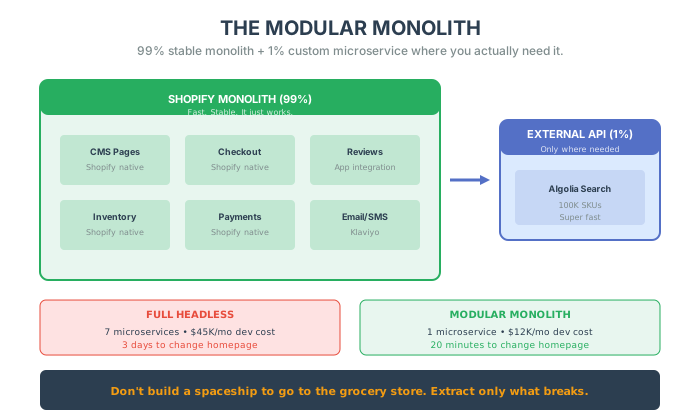
Start with a Monolith (like Shopify). It works. It’s fast. It converts. Then, wait until one specific part breaks.
Maybe your search bar is too slow because you have 100,000 SKUs. Don’t rebuild the whole site. Just carve out the Search. Buy a Search API (like Algolia). Plug it into your Monolith.
Now you have:
- 99% Monolith: Reviews, Checkout, Pages (Easy to manage).
- 1% Microservice: Search (Super fast).
You get the speed of the Monolith with the power of Custom Tech. This is how you scale without the headache.
APIs: The Backbone of Operational Efficiency
Section titled “APIs: The Backbone of Operational Efficiency”Every ambitious e-commerce business eventually hits a wall. It’s not marketing, design, or even product quality that causes the stall—it’s operations.
You can only process so many orders, manage so many suppliers, and update so many product listings before your team starts to feel the strain.
Here’s the kicker: most businesses try to solve this problem the wrong way. They hire more people, bolt on manual processes, or invest in bloated software that adds complexity without addressing the root cause.
The real solution? APIs.
APIs are the unseen bridges that connect your tools and platforms. Without them, systems are siloed, forcing humans to act as middlemen—copying data from your e-commerce platform into your inventory system, reconciling orders manually, syncing shipping updates by hand.
When APIs step in, that friction vanishes:
1. Inventory Management APIs ensure your store only displays products that are in stock, reducing overselling and the headaches that follow.
2. Shipping Automation Real-time tracking APIs from carriers like FedEx or UPS update your customers automatically, slashing “Where’s my order?” emails.
3. Marketing Precision Ads on Facebook or Google can pull real-time pricing and inventory levels directly from your store—so you never advertise out-of-stock items.
Scaling Smart vs. Scaling Hard
Section titled “Scaling Smart vs. Scaling Hard”Here’s where most operators stumble: they try to scale by brute force.
More orders? Add headcount. New sales channels? Another manual workflow.
It works… for a while. But it’s like patching leaks in a sinking ship. Eventually, the inefficiency costs you money, time, and customer trust.
Smart scaling flips that script. Instead of throwing people at operational challenges, you design systems that can grow without breaking.
APIs make that possible by:
- Standardizing connections – No more custom integrations every time you adopt a new tool.
- Reducing human error – Automating repetitive tasks means fewer mistakes and faster processes.
- Enabling flexibility – Want to start selling on TikTok, launch a new product line, or offer international shipping? APIs make those transitions smoother.
Consider Amazon. They didn’t become an e-commerce titan by hiring armies of humans to manage every process. They leaned heavily on technology, and their APIs power everything from Prime Shipping logistics to the algorithm that recommends your next purchase.
The API Trap
Section titled “The API Trap”APIs aren’t a magic wand. They only work if you approach them with the right mindset:
- You need a systems-first mentality. Map out your processes and identify where automation truly adds value.
- Documentation matters. An API is only as good as its ability to integrate with your stack.
- APIs evolve. Staying competitive means staying informed about updates and deprecations.
Treat APIs as “set-it-and-forget-it” solutions, and you’ll be blindsided by outages or integration failures later.
When Headless Makes Sense (And When It Doesn’t)
Section titled “When Headless Makes Sense (And When It Doesn’t)”The allure of headless architecture is strong. But it’s not a one-size-fits-all solution.
When It DOES Make Sense:
1. Complex Omnichannel Needs If your e-commerce business operates across various channels—websites, mobile apps, kiosks, IoT devices—a headless CMS can centralize your content management. Your product descriptions, marketing content, and images remain consistent regardless of where customers interact with your brand.
2. Customization and Flexibility Traditional CMS platforms come with pre-defined front-end frameworks, limiting customization. A headless CMS allows developers to build custom experiences using any technology they prefer. If you want highly customized user experiences or cutting-edge front-end technologies, headless enables that.
3. Scalability and Future-Proofing Since headless operates via APIs, it’s easier to scale and add new functionalities without rebuilding the entire system. This makes it a great long-term solution for growing e-commerce businesses.
When It DOESN’T Make Sense:
1. Limited Development Resources A headless CMS requires skilled developers to build and maintain the front-end. For smaller e-commerce businesses without a dedicated tech team, the costs and resources can outweigh the benefits. Traditional CMS platforms like Shopify provide out-of-the-box solutions that don’t require as much custom development.
2. Simple Content Management Needs If your e-commerce business primarily operates through a single channel and doesn’t require extensive omnichannel support, a headless CMS may be overkill. Traditional platforms already provide powerful content management tools.
3. Cost Concerns Implementing a headless CMS comes with significant upfront costs—development resources, ongoing maintenance, integrating new technologies. For businesses on tight budgets, these costs might outweigh the long-term benefits.
4. Speed to Market Priority Because headless systems require significant development effort, they can slow down your launch time. If speed is a priority—for time-sensitive marketing campaigns—sticking with a traditional CMS that offers ready-made templates may be better.
The Nike Example
Section titled “The Nike Example”Nike benefits enormously from headless architecture. With a massive global presence and emphasis on omnichannel customer experiences, Nike needs consistency across its website, mobile apps, and in-store digital displays. Their headless CMS allows them to manage content centrally and deliver personalized experiences seamlessly across all platforms.
But I’ve also seen a small fashion retailer attempt to transition to headless to offer a more dynamic shopping experience. With limited developer resources, the process became overwhelming. They struggled to maintain the system and constantly outsourced work, leading to increased costs and slower time to market. They reverted to a traditional CMS that met their simpler needs more effectively.
The lesson: Match your architecture to your actual needs, not your aspirations.
The “Friday Deploy” Test
Section titled “The “Friday Deploy” Test”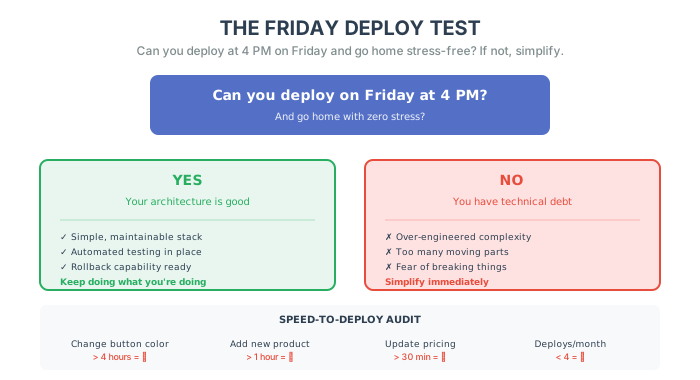
How do you know if your architecture is good? I have a simple test.
Can you deploy a meaningful change to your site on Friday at 5 PM and go home with zero stress?
If the answer is “No”—if you are scared it will crash the site—your architecture is too complex. You have created “Technical Debt.” You are paying interest on complexity every single day.
Pay it down. Simplify.
Case Study: The Headless Retreat
Section titled “Case Study: The Headless Retreat”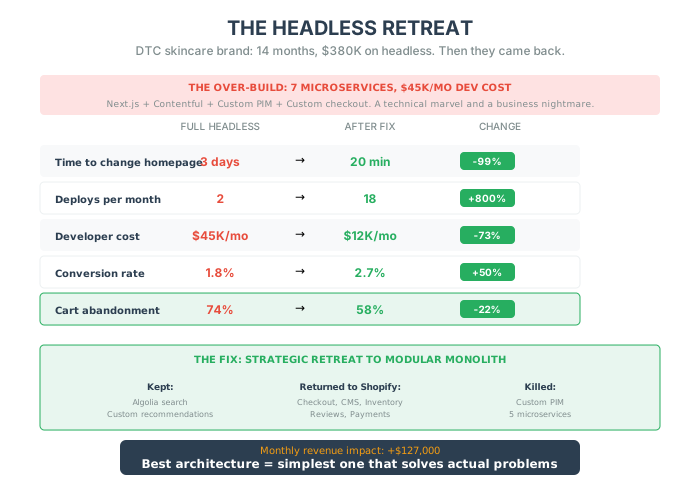
A DTC skincare brand came to me after spending 14 months and $380,000 on a headless rebuild.
The Situation
Section titled “The Situation”They had been on Shopify. It worked. But their CTO convinced them they needed to “go headless to scale.”
So they rebuilt everything:
- Next.js frontend
- Custom checkout
- Separate CMS (Contentful)
- Custom product information manager
- Seven microservices connecting everything
The result? A technical marvel. And a business nightmare.
The Numbers:
- Time to change homepage hero: 3 days (vs. 15 minutes on Shopify)
- Deploys per month: 2 (vs. 12 on Shopify)
- Developer cost: 8,000 before)
- Conversion rate: 1.8% (down from 2.4% due to checkout issues)
- Cart abandonment: 74% (up from 62%)
They had built a Ferrari engine for a golf cart. And the golf cart was slower.
The Detection Phase
Section titled “The Detection Phase”We ran the detection protocol:
Speed-to-Deploy Audit:
- Change button color: 2 days (🚨)
- Add new product: 4 hours (🚨)
- Deploy on Friday: “Absolutely not” (🚨)
Integration Fragility Audit:
- Reviews API down = entire product page fails (🚨)
- CMS timeout = homepage shows blank (🚨)
- 47 points of potential failure across the stack
API Performance Audit:
- 73 API calls per product page (🚨)
- Average API response time: 2.4 seconds (🚨)
- Failed requests: 2.3% under normal load (🚨)
The Intervention
Section titled “The Intervention”Week 1-4 (Surgical Triage):
- Added fallback states for all non-critical systems
- Implemented aggressive API caching
- Consolidated 73 API calls down to 28
Month 2-3 (Strategic Retreat):
- Migrated checkout back to Shopify native (immediate conversion lift)
- Kept only the custom elements that actually provided value
- Moved CMS content back to Shopify sections
Month 4-6 (Modular Monolith Rebuild):
- Core site back on Shopify
- Kept headless search (Algolia) where it added value
- Custom recommendations engine (only thing that justified complexity)
The Results
Section titled “The Results”| Metric | Full Headless | After Fix | Change |
|---|---|---|---|
| Time to change homepage | 3 days | 20 minutes | -99% |
| Deploys per month | 2 | 18 | +800% |
| Developer cost | $45K/mo | $12K/mo | -73% |
| Conversion rate | 1.8% | 2.7% | +50% |
| Cart abandonment | 74% | 58% | -22% |
Monthly revenue impact: +$127,000 (from conversion + reduced costs)
The Lesson
Section titled “The Lesson”They didn’t need headless. They needed Algolia for search and a recommendation engine.
Instead, they built a spaceship to go to the grocery store.
The best architecture is the simplest one that solves your actual problems.
The Bottom Line
Section titled “The Bottom Line”Your customers don’t care about your tech stack. They don’t care if you use React or Liquid. They care if the page loads. They care if the button works.
Don’t build for Google’s scale. Build for your scale.
In the next chapter, we are going to look at the most critical piece of tech in your entire stack: The Checkout. Because if that breaks, nothing else matters.
Five things to do this week
Section titled “Five things to do this week”- The “Friday Test”: Ask your team: “Can we deploy right now (Friday 4 PM)?” If they scream “No!”, you have technical debt. Schedule a “Code Cleanup” sprints immediately.
- Audit Your “Headless” Dreams: If you are under $50M/year and not Nike, stop building custom front-ends. Move back to a Monolith or investigate “Hydrogen” carefully. Don’t drown in complexity.
- Check Your Payloads: Open Network tab. Reload your site. Are you loading a 5MB JSON file just to show a product title? Optimization starts with sending less data.
- Map Your Integrations: Draw a map of every tool connected to your store. Circle the ones that break often. If one tool breaks the whole site, decouple it (make it asynchronous).
- Kill One Microservice: Find one piece of “custom tech” that breaks often and replace it with a native Shopify feature or a stable App. Boring is profitable.