

Analytics & Metrics
Moving beyond pageviews to data that drives decisions
“What gets measured gets managed.”
Peter Drucker
I was on a call with a founder. Let’s call him “Dashboard Dan.”
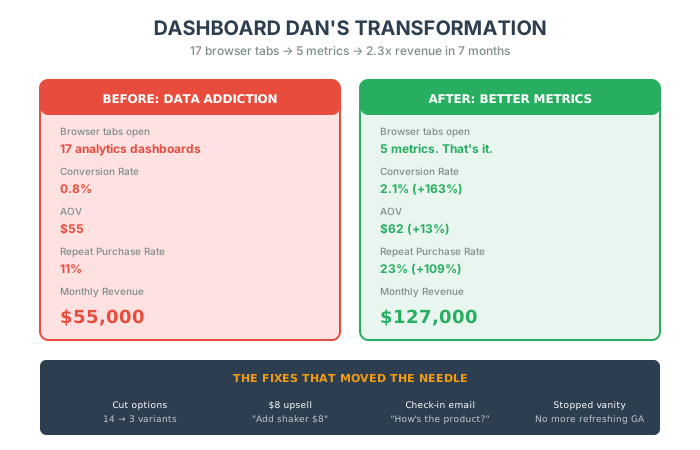
Dan had seventeen browser tabs open. Each one showing a different analytics dashboard.
Google Analytics. Facebook Ads Manager. Hotjar. Mixpanel. Shopify Analytics. Some custom thing his dev built. Another SaaS tool with “AI-powered insights.”
He was drowning in data.
“Alex, I need help. My traffic is up 40% month-over-month. My Instagram followers doubled. I’m getting 10,000 sessions a week. But revenue is flat. What am I missing?”
I asked him one question: “How many of those 10,000 sessions turned into paying customers?”
Silence.
“I… I don’t know. I’d have to check.”
“Okay. And of the people who did buy, how many came back for a second purchase?”
More silence.
“I’m not sure. Maybe 10%?”
Dan had a data addiction. But he was addicted to the wrong data.
He was measuring everything. And managing nothing.
[Vanity Metrics]: Numbers that make you feel good but don’t make you money. Traffic. Followers. Page views. Sessions.
They’re seductive. They’re easy to track. They go up and to the right and make you feel like you’re winning.
But they don’t pay your mortgage.
Here’s the truth that nobody wants to hear: You don’t need more data. You need better questions.
And the only questions that matter are the ones that lead to more money in your bank account.
Let me show you the only 5 metrics that actually move the needle.
The Vanity Metric Trap
Section titled “The Vanity Metric Trap”Before we get to the good stuff, let me explain why Dan (and probably you) is obsessed with the wrong numbers.
Why Vanity Metrics Are Addictive
Section titled “Why Vanity Metrics Are Addictive”1. They’re easy to measure
Google Analytics is free. It tracks everything. You don’t have to do anything. Just install a pixel and boom—dashboards full of pretty charts.
But easy to measure doesn’t mean meaningful.
100,000 visitors means nothing if zero of them buy.
2. They give the illusion of growth
Traffic going up? Must be good, right?
Wrong.
If your traffic doubles but your revenue stays flat, you don’t have a growth problem. You have a conversion problem. Or a product problem. Or a pricing problem.
But the vanity metrics won’t tell you that.
3. They’re short-term dopamine hits
Watching your Instagram followers tick up every day feels good. It’s measurable progress. It’s validation.
But followers don’t pay rent. Customers do.
4. They’re addictive
Dan wasn’t checking his dashboards because they were useful. He was checking them because they made him feel productive.
He’d refresh Google Analytics 40 times a day. He’d screenshot his traffic spikes and send them to his co-founder. “Look! We’re growing!”
But when I asked him how much profit he made last month, he couldn’t tell me without opening QuickBooks.
That’s the trap.
You’re measuring what’s easy. Not what matters.
The Only 5 Metrics That Matter
Section titled “The Only 5 Metrics That Matter”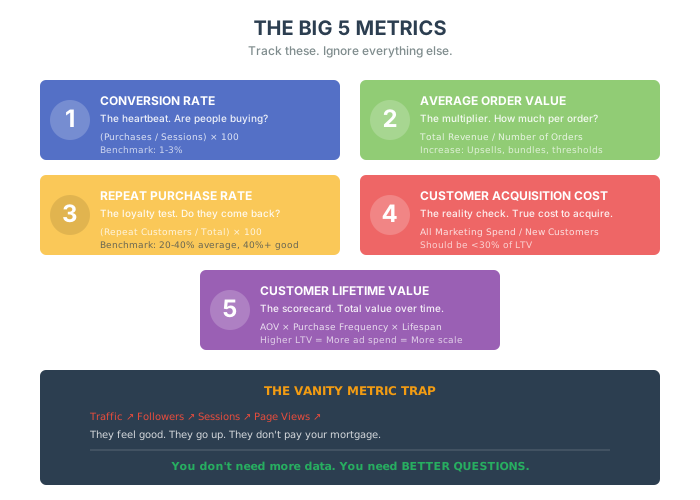
Here’s what I told Dan: “Pick 5 numbers. Track them religiously. Ignore everything else.”
He looked at me like I was insane.
“Just 5?”
“Just 5.”
Let me break them down.
Metric #1: Conversion Rate
Section titled “Metric #1: Conversion Rate”[Conversion Rate]: The percentage of visitors who become customers. That’s it.
Formula:
Conversion Rate = (Number of Purchases / Number of Sessions) × 100
Why It Matters:
This is the heartbeat of your business. When conversion rate drops, something is broken. When it spikes, something is working.
It’s your early warning system.
The Benchmark:
Most e-commerce stores convert at 1-3%. If you’re below 1%, you have a serious problem. If you’re above 4%, you’re doing something right.
But here’s the thing: your conversion rate tells you if you have a problem. It doesn’t tell you what the problem is.
That’s where the detective work begins.
Common Reasons Conversion Rate Drops:
- Confusing checkout flow
- Slow site speed
- Bad product images
- Weak copy
- No trust signals (reviews, guarantees, badges)
- Price too high (or too low—yes, that’s a thing)
- You’re attracting the wrong traffic
How Dan Fixed His:
Dan’s conversion rate was 0.8%. Terrible.
We ran a 5-second test: I sent him a link to his site and asked him to buy a product without any guidance.
He got stuck on the product page. There were 14 different options (size, color, material, finish). No guidance on which to pick. No “most popular” indicator. Just 14 dropdowns staring at him.
Paradox of choice. Too many options. Brain freeze. Bounce.
We simplified it. Cut the options to 3. Added a “Best Seller” badge to one. Added a comparison chart.
Conversion rate went from 0.8% to 2.1% in two weeks.
Same traffic. Same product. 2.6x more revenue.
Pro Tip: The “One Thing” Rule
Every page should have one goal. Product page goal? Add to cart. Cart page goal? Checkout. Checkout page goal? Complete purchase.
If there are 5 buttons on your product page, you’re confusing people. Remove everything that doesn’t support the one goal.
Metric #2: Average Order Value (AOV)
Section titled “Metric #2: Average Order Value (AOV)”[Average Order Value (AOV)]: How much money the average customer spends per transaction.
Formula:
AOV = Total Revenue / Number of Orders
Why It Matters:
Andrew Youderian (e-commerce legend) once said: “AOV is the most important number in e-commerce.”
He’s right.
Because here’s the math most people miss:
Scenario A:
- 100 customers
- $50 AOV
- Revenue: $5,000
Scenario B:
- 100 customers (same)
- $75 AOV (50% higher)
- Revenue: $7,500
Same traffic. Same conversion rate. 50% more revenue.
And here’s the kicker: it’s way easier to get someone to spend $25 more after they’ve decided to buy than it is to get a new customer.
How to Increase AOV:
- Upsells – “Add this for 20% off”
- Bundles – “Buy 3, save 15%”
- Free Shipping Thresholds – “Spend 62)
- Recommended Products – “Customers also bought…”
- Tiered Pricing – “Good / Better / Best”
Dan’s AOV Hack:
Dan sold supplements. His AOV was $55 (one bottle of protein powder).
We added a single line to his checkout page: “Add a shaker bottle for $8 (40% off)?”
37% of people said yes.
AOV went from 62.
That’s 7,000/month in pure profit.
$84,000/year from one line of text.
Wild, right?
Metric #3: Repeat Purchase Rate
Section titled “Metric #3: Repeat Purchase Rate”[Repeat Purchase Rate]: The percentage of customers who buy from you more than once.
Formula:
Repeat Purchase Rate = (Number of Repeat Customers / Total Number of Customers) × 100
Why It Matters:
Remember Sarah from the last chapter? She had a 4% repeat purchase rate. That meant 96% of her customers bought once and disappeared forever.
She was running a customer rental business.
Here’s the brutal truth: It costs 5x more to acquire a new customer than to retain an existing one.
And loyal customers spend 67% more than new customers [source].
So if your repeat purchase rate is low, you’re bleeding money.
The Benchmark:
- Below 20%: You have a retention problem. Fix it immediately.
- 20-40%: You’re average. Room for improvement.
- 40-60%: You’re doing well. Keep optimizing.
- Above 60%: You’ve built a loyalty machine. Don’t break it.
How to Fix It:
Go back and re-read the Habit Formation chapter. That’s your playbook.
Quick recap:
- Post-purchase emails (7 days, 30 days, 60 days)
- Surprise upgrades
- Loyalty programs
- VIP perks for high spenders
- Personalized recommendations
Dan’s Repeat Rate:
Dan’s was 11%. Embarrassing.
We implemented one thing: A “Just Checking In” email 14 days after delivery.
Subject: “Quick question about your protein…”
Body: “Hey [Name], just wanted to make sure the [Product] is working for you. If you have any issues, hit reply. We’ll fix it. No pitch. Just want you to be happy.”
No sales pitch. No discount code. Just genuine care.
31% of people replied. Most said “It’s great!” Some had questions. Dan’s team answered every single one within 4 hours.
Repeat purchase rate went from 11% to 23% in 90 days.
Metric #4: Customer Acquisition Cost (CAC)
Section titled “Metric #4: Customer Acquisition Cost (CAC)”[Customer Acquisition Cost (CAC)]: How much you spend to acquire one customer.
Formula:
CAC = Total Marketing Spend / Number of New Customers Acquired
Why It Matters:
If you spend 45, you’re going bankrupt.
Simple as that.
But here’s where it gets tricky: most people calculate CAC wrong.
They only count ad spend. They forget about:
- Creative costs (designers, videographers)
- Agency fees
- Software tools (Klaviyo, Attentive, etc.)
- Salaries of the marketing team
- Attribution tools
True CAC is always higher than you think.
The Benchmark:
Your CAC should be less than 30% of your Customer Lifetime Value (LTV).
If your LTV is 45.
Dan’s CAC Reality Check:
Dan thought his CAC was $38 (just Facebook ad spend).
When we added everything else:
- Facebook ads: $38
- Creative team: $12 per customer
- Klaviyo: $3 per customer
- Agency fee: $7 per customer
True CAC: $60
His AOV was $55.
He was losing $5 on every new customer.
“But Alex, I make it back on repeat purchases!”
Okay, let’s do the math:
- 11% repeat rate
- $55 AOV on repeat purchase
- Expected repeat revenue per customer: $6.05
Total LTV: 6.05 = $61.05
He was making $1.05 profit per customer.
That’s not a business. That’s a charity.
We had to fix his repeat rate AND his AOV to make the unit economics work.
After the changes:
- AOV: $62
- Repeat rate: 23%
- Average repeat purchases: 1.3x
- New LTV: 62 × 0.23 × 1.3) = $80.56
Now he’s making $20.56 per customer.
That’s a business.
Bonus Metrics Worth Tracking
Section titled “Bonus Metrics Worth Tracking”Before we get to LTV, here are two additional metrics that complement your core five:
Churn Rate
Your churn rate indicates how many customers stop doing business with you over a specific period.
Churn Rate = (Customers Lost During Period / Customers at Start of Period) × 100
Understanding why customers churn reveals significant insights into potential areas of improvement. For instance, if you notice a high churn rate after a particular touchpoint, you can investigate and address the underlying issues.
Net Promoter Score (NPS)
NPS measures customer satisfaction and loyalty by asking customers how likely they are to recommend your product or service to others on a scale of 0-10.
- Promoters (9-10): Loyal enthusiasts who will keep buying and refer others
- Passives (7-8): Satisfied but unenthusiastic customers
- Detractors (0-6): Unhappy customers who can damage your brand
NPS = % Promoters - % Detractors
High NPS scores indicate satisfied customers who are likely to become repeat buyers and brand advocates, driving organic growth through word-of-mouth. Monitoring NPS helps you understand satisfaction trends and identify areas for improvement.
Metric #5: Customer Lifetime Value (LTV)
Section titled “Metric #5: Customer Lifetime Value (LTV)”[Customer Lifetime Value (LTV)]: The total amount of money a customer spends with you over their entire relationship with your brand.
Formula:
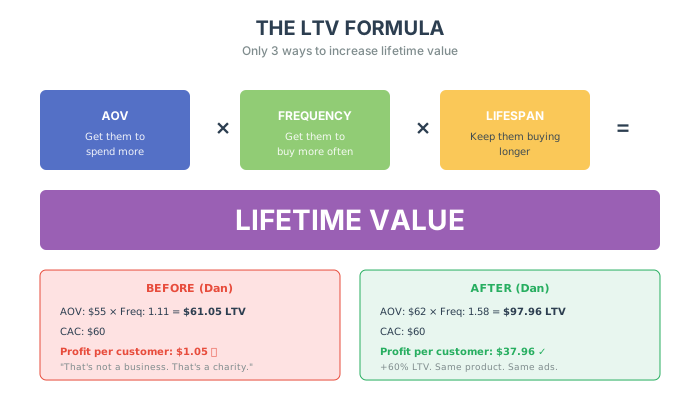
LTV = AOV × Purchase Frequency × Customer Lifespan
Why It Matters:
This is the ultimate scorecard. This is the number that determines if you can scale or if you’re stuck.
Because here’s the truth: You can only spend up to 30% of LTV on acquisition and still be profitable.
If your LTV is 30 on CAC.
If your LTV is 90 on CAC.
Higher LTV = More you can spend on ads = More you can scale.
How to Increase LTV:
There are only 3 ways:
- Increase AOV – Get them to spend more per order
- Increase Purchase Frequency – Get them to buy more often
- Increase Customer Lifespan – Keep them buying longer
That’s it. Every retention tactic in the world falls into one of these three buckets.
Dan’s LTV Transformation:
Before:
- AOV: $55
- Purchase Frequency: 1.11 (barely any repeats)
- LTV: $61.05
After:
- AOV: $62 (bundles + upsells)
- Purchase Frequency: 1.58 (better post-purchase experience)
- LTV: $97.96
He increased LTV by 60%.
Same product. Same ads. Same website (mostly).
Just better metrics.
The Dashboard Dan Doesn’t Need Anymore
Section titled “The Dashboard Dan Doesn’t Need Anymore”Here’s what I told Dan after we fixed his metrics:
“Close 12 of those 17 tabs. You don’t need them.”
His new dashboard:
- Conversion Rate – Are people buying?
- AOV – How much are they spending?
- Repeat Purchase Rate – Are they coming back?
- CAC – How much does it cost to get them?
- LTV – How much are they worth?
That’s it.
Every Monday morning, Dan looks at these 5 numbers. If one is trending down, he investigates. If one is trending up, he doubles down.
He stopped obsessing over traffic. Stopped caring about Instagram followers. Stopped refreshing Google Analytics 40 times a day.
He started making money.
Revenue went from 127,000/month in 7 months.
Same team. Same product. Same traffic (actually, slightly less traffic).
Better metrics.
Choosing Your Analytics Platform: Google vs. Adobe
Section titled “Choosing Your Analytics Platform: Google vs. Adobe”Now that you know what to track, let’s talk about how to track it.
I get this question a lot: “Alex, should I use Google Analytics or Adobe Analytics?”
Here’s my honest take:
Google Analytics (GA4)
Section titled “Google Analytics (GA4)”Best For: Startups, small-to-mid businesses, and anyone who wants robust analytics without paying a dime.
Pros:
- Free. Yes, the full version is free.
- Integrates perfectly with Google Ads, Google Merchant Center, YouTube
- Easy setup – install a pixel and you’re tracking
- Automated insights – GA4’s machine learning surfaces anomalies automatically
Cons:
- Sampled data at high volumes (can affect accuracy)
- Limited customization compared to enterprise tools
- Steeper learning curve for GA4 vs. Universal Analytics
Adobe Analytics
Section titled “Adobe Analytics”Best For: Enterprise brands with complex data needs and dedicated analytics teams.
Pros:
- Hit-level data – no sampling, full accuracy
- Advanced segmentation – built right into Analysis Workspace
- Multi-channel stitching – connects web, app, call center, POS seamlessly
- Customization heaven – track anything, any way you want
Cons:
- Expensive. We’re talking enterprise pricing.
- Requires dedicated personnel to manage and interpret
- Steep learning curve – takes months to master
My Recommendation
Section titled “My Recommendation”Under $5M/year revenue: Use Google Analytics. It’s free, it’s powerful, and it’ll give you everything you need to make smart decisions.
50M/year revenue: Keep using GA4, but consider adding specialized tools (Mixpanel for product analytics, Hotjar for heatmaps) where needed.
$50M+ revenue: Evaluate Adobe Analytics. At this scale, the precision and customization often justify the cost.
Pro Tip: Don’t switch platforms just because you can. The learning curve is brutal. Master one platform before jumping to another.
The Detection Protocol: Are Your Analytics Broken?
Section titled “The Detection Protocol: Are Your Analytics Broken?”Before you can fix your metrics, you need to know what’s actually broken. Here’s a 20-minute audit to diagnose your analytics health.
Step 1: The “Five Numbers” Test (5 minutes)
Section titled “Step 1: The “Five Numbers” Test (5 minutes)”Open a blank document. Write down:
- Your conversion rate (last 30 days)
- Your average order value
- Your repeat purchase rate
- Your true CAC (including all costs)
- Your customer lifetime value
Red flags:
- 🚨 Can’t find one or more numbers without digging for 10+ minutes
- 🚨 Different team members give you different numbers
- 🚨 Your LTV is less than 3x your CAC
- 🚨 You don’t know the difference between reported CAC and true CAC
If you couldn’t fill this out in 5 minutes, you have an analytics infrastructure problem before you have a metrics problem.
Step 2: The “Segment Drill-Down” Test (5 minutes)
Section titled “Step 2: The “Segment Drill-Down” Test (5 minutes)”Can you answer these questions in under 60 seconds each?
- What’s your conversion rate for mobile vs. desktop?
- Which traffic source has the highest AOV?
- What percentage of customers who buy once come back within 90 days?
- Which product category has the highest repeat purchase rate?
Red flags:
- 🚨 You can see totals but not segments
- 🚨 Your analytics tool doesn’t connect to your revenue data
- 🚨 You’re comparing apples to oranges (session-based vs. user-based metrics)
Step 3: The “Attribution Sanity” Test (5 minutes)
Section titled “Step 3: The “Attribution Sanity” Test (5 minutes)”Look at your marketing channels. Add up the revenue each channel claims credit for.
Is the total more than your actual revenue?
Example:
- Facebook Ads claims: $80,000
- Google Ads claims: $60,000
- Email claims: $40,000
- Organic claims: $30,000
- Total claimed: $210,000
- Actual revenue: $150,000
That’s a 40% over-attribution. Every channel is taking credit for the same customers.
Red flags:
- 🚨 Channel-attributed revenue exceeds total revenue by more than 20%
- 🚨 You don’t know which attribution model you’re using
- 🚨 You make budget decisions based on last-click attribution alone
Step 4: The “Fresh Data” Test (5 minutes)
Section titled “Step 4: The “Fresh Data” Test (5 minutes)”When did your dashboards last update?
- Real-time: Excellent
- Daily: Good
- Weekly: Warning
- Monthly: Broken
Red flags:
- 🚨 You’re making decisions on month-old data
- 🚨 Your data pipelines break and nobody notices for days
- 🚨 Different dashboards show different numbers for the same metric
The 3-Tier Analytics Fix Framework
Section titled “The 3-Tier Analytics Fix Framework”Now that you know what’s broken, here’s how to fix it.
Quick Fixes (This Week: 2-4 hours, immediate impact)
Section titled “Quick Fixes (This Week: 2-4 hours, immediate impact)”1. Create Your “Single Source of Truth” Dashboard
- Time: 2 hours
- Impact: Eliminates confusion, speeds up decision-making
- How: Pick one tool (GA4, Shopify, Mixpanel). Build one dashboard with just the Big 5. Share it with your team. Kill all other dashboards.
2. Set Up Automated Alerts
- Time: 1 hour
- Impact: Catch problems before they become crises
- How: Create alerts for:
- Conversion rate drops more than 20% day-over-day
- AOV drops more than 15%
- Traffic from any major source drops more than 30%
3. Calculate Your True CAC (Finally)
- Time: 1 hour
- Impact: Know your real unit economics
- How: Add up ALL marketing costs (ads + creative + agency + software + team salaries). Divide by new customers. Update your dashboard.
Medium Fixes (This Month: 1-2 weeks, systematic improvement)
Section titled “Medium Fixes (This Month: 1-2 weeks, systematic improvement)”1. Build Cohort Tracking
- Time: 1 week
- Impact: See how customer behavior changes over time
- How: Tag customers by acquisition month. Track their LTV at 30, 60, 90, 180, and 365 days. See which cohorts are more valuable.
2. Implement Event-Based Tracking
- Time: 1 week
- Impact: Understand the why behind your numbers
- How: Track key micro-conversions:
- Add to cart
- Start checkout
- Complete checkout
- Create account
- Use search
- View reviews
3. Build a Revenue Attribution Model
- Time: 1 week
- Impact: Allocate budget to what actually works
- How: Move from last-click to data-driven or position-based attribution. Compare channel performance under both models.
Deep Fixes (This Quarter: 4-8 weeks, competitive advantage)
Section titled “Deep Fixes (This Quarter: 4-8 weeks, competitive advantage)”1. Customer Data Platform (CDP) Implementation
- Time: 4-6 weeks
- Impact: Unified customer view across all touchpoints
- Tools: Segment, Klaviyo CDP, mParticle
- Result: See every customer interaction in one place
2. Predictive Analytics Setup
- Time: 4-8 weeks
- Impact: Anticipate churn, predict LTV, optimize inventory
- How: Use tools with built-in ML (Shopify Plus, BigQuery ML) or partner with a data science team
3. Real-Time Personalization
- Time: 6-8 weeks
- Impact: 10-30% lift in conversion rate
- How: Use real-time behavior data to personalize product recommendations, email timing, and offers
Mastering Google Analytics 4
Section titled “Mastering Google Analytics 4”Let me get practical about GA4, since it’s what most of you are using.
The Reports That Actually Matter
Section titled “The Reports That Actually Matter”1. Acquisition Overview
- Where to find it: Reports > Acquisition > Overview
- Why it matters: Shows which channels drive traffic and revenue
- What to look for: High-traffic, low-conversion sources (fix them or cut them)
2. Engagement Overview
- Where to find it: Reports > Engagement > Overview
- Why it matters: Shows how users interact with your site
- Key metrics: Engagement rate, average engagement time, events per session
3. Monetization Overview
- Where to find it: Reports > Monetization > Overview
- Why it matters: Shows the money—purchases, revenue, AOV
- Key insight: Segment by device, source, or campaign to find winners
4. Retention
- Where to find it: Reports > Retention
- Why it matters: Shows repeat behavior over time
- Key insight: How many users return in week 1, 2, 3, 4+?
The Explorations That Reveal Hidden Gold
Section titled “The Explorations That Reveal Hidden Gold”Path Exploration: See exactly how users navigate your site. Find where they drop off.
Funnel Exploration: Build custom funnels (e.g., Homepage → Category → Product → Cart → Purchase). See where you’re leaking customers.
Segment Overlap: Compare segments (e.g., “High AOV customers” vs. “Mobile users” vs. “Email subscribers”). Find your best customers’ common traits.
Pro Tips for GA4 Power Users
Section titled “Pro Tips for GA4 Power Users”- Create Custom Definitions – Track button clicks, form submissions, and video plays as events
- Use Comparisons – Compare time periods, segments, or traffic sources side-by-side
- Build Custom Reports – Save your most-used views as custom reports for quick access
- Set Up Conversions – Mark key events (purchase, lead form, signup) as conversions for better optimization
The Attribution Reality Check
Section titled “The Attribution Reality Check”Here’s a topic that trips up even experienced marketers: attribution.
Most brands give 100% credit to the last touchpoint before purchase. That’s called “last-click attribution.”
The problem? It completely ignores the customer journey.
A Real Example
Section titled “A Real Example”Sarah discovers your brand through a podcast ad. She visits your site but doesn’t buy.
Two days later, she sees a Facebook retargeting ad. Clicks but doesn’t buy.
A week later, she gets an email with a discount code. She clicks, buys.
Last-click attribution says: Email gets 100% credit.
Reality: The podcast and Facebook ads did the heavy lifting. Email just closed.
If you cut the podcast and Facebook ads because they “don’t convert,” you’ll kill your email revenue too.
Better Attribution Models
Section titled “Better Attribution Models”Linear: Every touchpoint gets equal credit.
- Pros: Simple, fair
- Cons: Ignores that some touches matter more
Time Decay: Recent touches get more credit.
- Pros: Accounts for recency
- Cons: Undervalues awareness channels
Position-Based (U-Shaped): First and last touch get 40% each; middle touches share 20%.
- Pros: Values both discovery and conversion
- Cons: Still somewhat arbitrary
Data-Driven: Machine learning allocates credit based on actual patterns.
- Pros: Most accurate
- Cons: Requires significant data volume
My Recommendation
Section titled “My Recommendation”Use position-based for decision-making. First touch tells you what’s working for awareness. Last touch tells you what’s closing deals. Both matter.
And never cut a channel based purely on last-click data. Look at assisted conversions first.
From Reactive to Predictive
Section titled “From Reactive to Predictive”Here’s the final evolution of analytics mastery: stop just reporting what happened. Start predicting what’s coming.
Reactive Analytics (Rearview Mirror):
- “Sales were down 12% last month.”
- “Our conversion rate dropped last Tuesday.”
- “We lost 200 customers in Q3.”
Predictive Analytics (Windshield):
- “Based on current trends, we’ll likely see a 15% dip next month unless we act now.”
- “This cohort of customers shows early warning signs of churning. Let’s intervene.”
- “Inventory for SKU-1234 will run out in 18 days at current velocity.”
How to Build Predictive Capability:
- Build forecasting models – Project sales, inventory needs, and trends over the next week, month, and quarter.
- Identify leading indicators – Spot problems like inventory stock-outs before they cause revenue dips.
- Automate insights – Set up alerts for significant changes in your key metrics so you’re notified before damage is done.
- Run simulations – Model different scenarios to estimate results and prepare strategies in advance.
The companies that win aren’t just looking at what happened yesterday. They’re anticipating what’s ahead.
Case Study: The Analytics Overhaul
Section titled “Case Study: The Analytics Overhaul”A fashion accessories brand came to me with a familiar complaint: “We’re growing but we’re not profitable.”
The Situation
Section titled “The Situation”They had raised a seed round. Hired a growth team. Built dashboards in five different tools. They could tell you their Instagram engagement rate to two decimal places.
But when I asked for their LTV:CAC ratio, three people gave me three different numbers.
- CMO: “About 2.5:1”
- CFO: “More like 1.8:1”
- Head of Growth: “We don’t actually track that”
Red flags everywhere.
The Detection Phase
Section titled “The Detection Phase”We ran the Detection Protocol:
Step 1 (Five Numbers Test):
- Conversion rate: Could find it (1.7%)
- AOV: Could find it ($78)
- Repeat purchase rate: “Around 15%… I think?” (🚨)
- True CAC: “Our ad spend CAC is $42” (🚨 - not true CAC)
- LTV: Three different answers (🚨)
Step 2 (Segment Drill-Down):
- Mobile vs. desktop conversion: “We’d have to check” (🚨)
- Highest AOV traffic source: “Probably email?” (🚨 - guessing)
- 90-day repeat rate: “No idea” (🚨)
Step 3 (Attribution Sanity):
- Claimed revenue from all channels: $2.4M
- Actual revenue: $1.6M
- Over-attribution: 50% (🚨 Critical)
Step 4 (Fresh Data):
- Main dashboard updated: Weekly
- Financial data: Monthly (🚨)
- Team making daily decisions on month-old data
The Intervention
Section titled “The Intervention”Week 1-2 (Quick Fixes):
- Built a Single Source of Truth dashboard with only the Big 5
- Calculated True CAC: 18 (creative) + 12 (team allocation) = **42)
- Set up automated alerts for conversion rate and AOV drops
Week 3-6 (Medium Fixes):
- Implemented proper cohort tracking by acquisition month
- Built event-based funnel tracking (homepage → category → product → cart → purchase)
- Moved from last-click to position-based attribution
Week 7-12 (Deep Fix):
- Implemented a basic CDP connecting Shopify, Klaviyo, and ad platforms
- Built predictive churn scoring for customers who hadn’t purchased in 60+ days
The Numbers Reality
Section titled “The Numbers Reality”When we finally had clean data, the truth was brutal:
| Metric | What They Thought | Reality |
|---|---|---|
| CAC | $42 | $80 |
| LTV | $120 | $94 |
| LTV:CAC Ratio | 2.8:1 | 1.2:1 (🚨) |
| Profitable Channels | All of them | Only email and organic |
They were losing money on 68% of their ad spend. They just couldn’t see it because their data was broken.
The Fix
Section titled “The Fix”Once they could see the truth:
- Cut Facebook prospecting spend by 60% (unprofitable)
- Doubled down on email and organic (profitable)
- Implemented the “78 to $91)
- Fixed their post-purchase sequence (repeat rate went from 15% to 28%)
The Results
Section titled “The Results”| Metric | Before | After (90 days) | Change |
|---|---|---|---|
| True CAC | $80 | $52 | -35% |
| AOV | $78 | $91 | +17% |
| Repeat Purchase Rate | 15% | 28% | +87% |
| LTV | $94 | $142 | +51% |
| LTV:CAC Ratio | 1.2:1 | 2.7:1 | +125% |
| Monthly Profit | -$18K | +$47K | +$65K swing |
Annual profit impact: +$780,000
The Lesson
Section titled “The Lesson”They didn’t need more data. They needed accurate data.
Their dashboards were beautiful. Their insights were garbage.
Once they could see the truth—that they were losing money on most of their marketing—they could finally fix it.
The most expensive analytics mistake isn’t having bad data. It’s making confident decisions based on bad data.
The Bottom Line
Section titled “The Bottom Line”You don’t need more data.
You need the right data.
Track these 5 metrics. Ignore everything else.
- Conversion Rate – The heartbeat
- Average Order Value – The multiplier
- Repeat Purchase Rate – The loyalty test
- Customer Acquisition Cost – The reality check
- Customer Lifetime Value – The scorecard
Master these, and you’ll know exactly where your business is broken and how to fix it.
Ignore them, and you’ll be Dashboard Dan—drowning in data but starving for revenue.
In the next chapter, we’re going to talk about why most A/B tests are a complete waste of time—and what to focus on instead.
Five things to do this week
Section titled “Five things to do this week”- Kill Your Dashboards: Close the 17 tabs. Open a spreadsheet. List the Big 5: Conversion Rate, AOV, Repeat Rate, CAC, LTV. Fill in last month’s numbers. If you can’t find them, that’s your first problem.
- Calculate True CAC: Go to your P&L. Add up Ad Spend + Agency Fees + Creative Costs + Software. Divide by new customers. Is it higher than 30% of your LTV? If yes, panic (then fix it).
- **The 5. “Mystery Gift” for $10. Watch your AOV jump overnight.
- Send the “Sarah” Email: Set up an automated email 14 days after purchase. Plain text. “Hey, just checking in. How’s the [Product]? - Founder.” Watch your repeat rate climb.
- Run the “One Thing” Audit: Print your product page. Circle the goal (Add to Cart). Cross out everything that distracts from it. If you have 5 social media icons next to the buy button, fire yourself. Then delete them.