

Funnel Optimization
Optimizing the path to purchase
“Friction kills everything.”
Jason Fried, Basecamp
I bought a pair of sneakers last week.
Or at least, I tried to.
I added them to cart. Clicked checkout. Got asked to create an account.
“Why do I need an account to buy shoes?”
Skip. Continue as guest.
Next page: shipping information. I entered my address.
Next page: billing information. “Please re-enter your billing address.”
It’s the same address. I literally just typed it.
Next page: “Do you want to join our SMS list for 10% off?”
I’m already at checkout. I’m already buying. Why are you asking me this now?
Next page: Review order.
Next page: “Please confirm you’re not a robot.”
I closed the tab.
Seven steps. Forty-three form fields. Four interruptions.
And they wonder why their cart abandonment rate is 73%.
The average cart abandonment rate across e-commerce is 69.99% [source].
Think about that.
Seven out of ten people who want to buy from you don’t.
Not because they don’t want the product. Not because the price is wrong.
Because you made it too hard to give you money.
Let me show you how to fix it.
The Funnel Detection Protocol
Section titled “The Funnel Detection Protocol”Before you optimize anything, you need to know where your funnel is actually bleeding. Most teams guess. Don’t guess.
Step 1: The Conversion Waterfall Audit
Section titled “Step 1: The Conversion Waterfall Audit”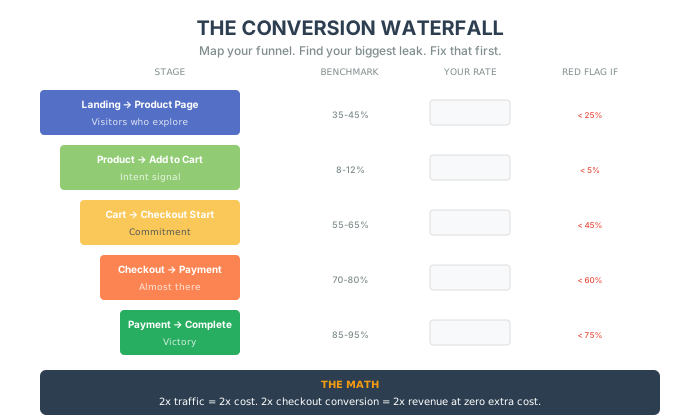
Map your actual conversion rates at each stage:
| Stage | Your Rate | Benchmark | 🚨 Red Flag If |
|---|---|---|---|
| Landing → Product Page | ___% | 35-45% | Below 25% |
| Product Page → Add to Cart | ___% | 8-12% | Below 5% |
| Add to Cart → Checkout Start | ___% | 55-65% | Below 45% |
| Checkout Start → Payment | ___% | 70-80% | Below 60% |
| Payment → Complete | ___% | 85-95% | Below 75% |
Calculate your total funnel efficiency: (Visitors) × (each conversion rate) = Orders
🚨 Red Flag: If your overall conversion is below 1.5%, you have at least one major leak.
Step 2: The Device Disparity Check
Section titled “Step 2: The Device Disparity Check”Pull conversion by device:
| Metric | Desktop | Mobile | 🚨 Red Flag If |
|---|---|---|---|
| Conversion Rate | ___% | ___% | Mobile < 50% of Desktop |
| Cart Abandonment | ___% | ___% | Mobile > Desktop + 10% |
| Checkout Time | ___ sec | ___ sec | Mobile > 2x Desktop |
| Payment Completion | ___% | ___% | Mobile < Desktop - 15% |
🚨 Red Flag: If mobile is drastically underperforming desktop, your checkout is broken for 60%+ of your traffic.
Step 3: The Friction Point Analysis
Section titled “Step 3: The Friction Point Analysis”Watch 20 session recordings of users who abandoned at checkout. Count:
| Friction Type | Occurrences | Priority |
|---|---|---|
| Hesitation at shipping costs | Critical | |
| Confusion at form fields | High | |
| Failed form validation | High | |
| Clicked away to find discount code | Medium | |
| Abandoned at account creation | Critical | |
| Payment method not available | High |
🚨 Red Flag: Any friction point occurring in 25%+ of sessions needs immediate attention.
Step 4: The Checkout Field Audit
Section titled “Step 4: The Checkout Field Audit”Count every field on your checkout:
| Field Type | Count | 🚨 Red Flag If |
|---|---|---|
| Required fields | ___ | > 12 |
| Optional fields | ___ | > 5 |
| Duplicate fields | ___ | > 0 |
| Total fields | ___ | > 15 |
🚨 Red Flag: Every field above 8 reduces conversion by approximately 2%.
The Checkout Paradox
Section titled “The Checkout Paradox”Here’s the thing nobody tells you: The checkout page is the most important page on your site. And it’s the one you probably care about the least.
Think about it.
How much time did you spend on your homepage? Your product pages? Your Instagram ads?
Now how much time did you spend optimizing your checkout?
Most founders: “Uh… we use Shopify’s default checkout. It works fine.”
No. It doesn’t.
Because “fine” is costing you millions.
Let me show you the math.
Scenario: “Good Enough” Gary
Gary runs a $3M/year DTC brand. His numbers:
- Monthly traffic: 50,000 visitors
- Conversion rate: 2.1% (industry average)
- Sales per month: 1,050
- Average Order Value: $75
- Monthly revenue: $78,750
Gary’s checkout has 6 steps. He thinks it’s “good enough.”
Now let me show you what happens if Gary optimizes his checkout and increases conversion by just 20% (from 2.1% to 2.5%).
“Optimized” Gary:
- Monthly traffic: 50,000 (same)
- Conversion rate: 2.5% (+0.4%)
- Sales per month: 1,250 (+200)
- Average Order Value: $75 (same)
- Monthly revenue: $93,750
That’s 180,000 more per year.
From the same traffic. Same product. Same ads.
Just a better checkout.
And a 20% lift from checkout optimization is conservative. I’ve seen 40-60% improvements from fixing major friction points.
The Micro-Friction Problem
Section titled “The Micro-Friction Problem”Here’s what nobody talks about: individual friction points don’t kill conversions. Stacking does.
Each tiny annoyance—a confusing field, a slow page load, a forced password—might only cost you 2-3% of customers on its own.
But those frictions compound.
One friction point: 97% continue. Two friction points: 94% continue. Three friction points: 91% continue. Four friction points: 88% continue. Five friction points: 85% continue.
Six points of micro-friction = 15% loss before checkout even begins.
And that’s just from the little stuff. The minor annoyances. The “that’s weird but okay” moments.
The question most founders never ask is:
“If we had to reduce this checkout to three clicks or less, what would we cut?”
You don’t even have to implement it. Just go through the thought experiment.
It forces ruthless prioritization. It surfaces bloat. It reveals assumptions you didn’t know you had.
The best-performing checkouts I’ve seen in the last 12 months all had one thing in common: they removed more than they added.
Everyone wants to add things. Klarna. Pop-ups. Loyalty points. SMS capture.
Almost no one asks: “What can we delete?”
The 3-Click Rule
Section titled “The 3-Click Rule”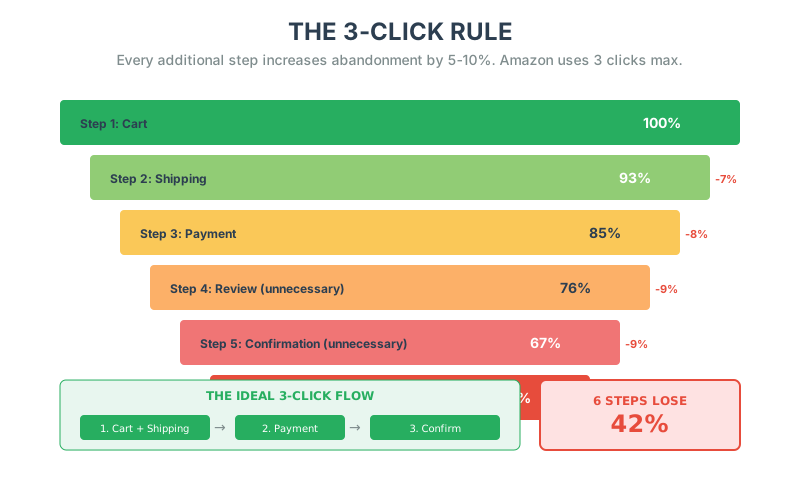
Amazon has a rule that nobody talks about: No more than 3 clicks from cart to confirmation.
One-click buy is the extreme version. But even when you’re not logged in, Amazon rarely requires more than three distinct actions.
Most e-commerce sites? Seven to twelve.
Why 3 clicks?
Because every additional step increases abandonment by 5-10%.
The Math:
- 1 step: 100% of people continue
- 2 steps: 93% continue (7% drop)
- 3 steps: 85% continue (8% drop)
- 4 steps: 76% continue (9% drop)
- 5 steps: 67% continue (9% drop)
- 6 steps: 58% continue (9% drop)
If your checkout has 6 steps, you’re losing 42% of people who wanted to buy.
The ideal checkout flow:
Step 1: Cart → Checkout
- Review items
- Enter shipping info
- Auto-populate billing (if same)
Step 2: Payment
- Enter payment method
- Apply discount code (if applicable)
Step 3: Confirmation
- Review & complete purchase
That’s it. Three clicks. Done.
Pro Tip: The “Guest First” Rule
Never force account creation before purchase. Let them buy as a guest, then offer account creation after they’ve paid.
Forced account creation increases abandonment by 24% [source].
The 7 Deadly Sins of Checkout
Section titled “The 7 Deadly Sins of Checkout”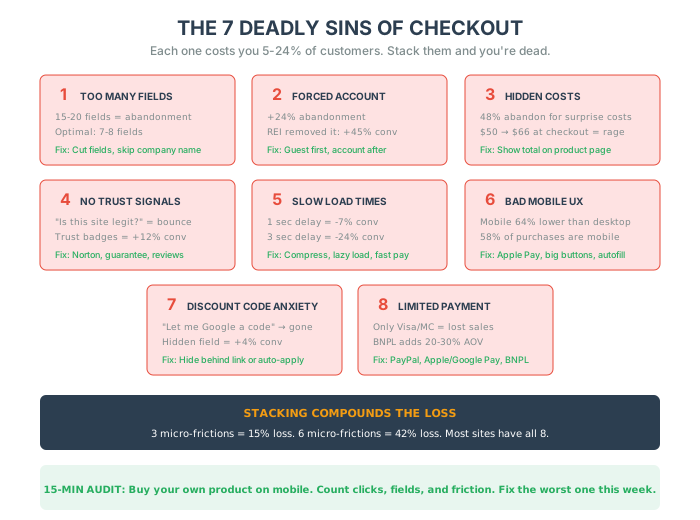
Let me walk you through the most common checkout killers. These are the mistakes I see over and over again.
Sin #1: Too Many Form Fields
Section titled “Sin #1: Too Many Form Fields”The Problem:
Most checkouts ask for 15-20 form fields. Every additional field increases abandonment.
The Data:
The optimal number of form fields is 7-8 [source].
What to cut:
- Company name (unless B2B)
- Fax number (seriously, why is this still a thing?)
- “Confirm email” field (just ask once)
- Separate billing address (default to “same as shipping”)
- Middle name
- Phone number (make it optional)
Example:
A furniture brand I worked with had 23 form fields.
We cut it to 9.
Conversion went from 1.8% to 2.7%. A 50% increase.
Same traffic. Same product. Fewer fields.
Sin #2: Forcing Account Creation
Section titled “Sin #2: Forcing Account Creation”The Problem:
“Create an account to continue.”
Instant abandonment.
Why it’s broken:
People don’t want to create an account. They want to buy your product.
Making them jump through hoops before they can give you money is insane.
The Fix:
Guest checkout. Always.
Then after they’ve purchased, offer account creation: “Save your info for faster checkout next time. Create account?”
Real numbers:
When REI removed forced account creation, conversion increased by 45% [source].
Sin #3: Hidden Costs
Section titled “Sin #3: Hidden Costs”The Problem:
Customer sees: “$49.99”
At checkout: “12 shipping + 66.49”
“Wait, what? I thought it was $50.”
Abandoned cart.
The Data:
Unexpected costs cause 48% of cart abandonment [source].
The Fix:
Show total cost as early as possible. Ideally on the product page.
- “Total with shipping: $66.49”
- “Free shipping on orders over $75” (and show how close they are)
- Shipping calculator on cart page
Bonus:
Free shipping thresholds increase AOV by 35% on average.
Instead of: “Shipping: $12”
Try: “You’re $18 away from free shipping!”
Suddenly they’re adding items to hit the threshold.
Sin #4: No Trust Signals
Section titled “Sin #4: No Trust Signals”The Problem:
Customer gets to checkout and thinks: “Wait, is this site legit?”
No reviews. No security badges. No return policy. No customer service info.
They bounce.
Here’s the thing: if someone gets to your checkout and leaves, it’s usually not because of price.
It’s because something felt off.
Confusing UI. Slow load times. An unexpected cost. The sense that their payment details might not be secure.
And when users get spooked or annoyed, they leave—often without giving feedback.
The Fix:
Add trust signals at checkout:
- Security badges (SSL, payment provider logos)
- Money-back guarantee
- Return policy (linked)
- Customer service contact
- “100,000+ happy customers”
- Real-time activity: “Sarah from Austin just purchased this”
Even a subtle nudge like “100% Secure Checkout – Your data is safe with us” can reduce last-minute drop-offs.
Real Example:
An apparel brand added trust badges to their checkout (Norton, McAfee, “Secure Checkout” copy).
Conversion increased 12%.
They didn’t change the security. Just made it visible.
The Checkout “Safe Room” Principle:
Here’s a controversial move: remove navigation links from your checkout page entirely.
No header links. No footer links. No “continue shopping” button.
If they’re ready to buy, your only job is to let them.
Tools like Stripe Checkout do this by default. If you’re building a custom flow, treat checkout like a “safe room”—no distractions, no exit routes, just the transaction.
Sin #5: Slow Load Times
Section titled “Sin #5: Slow Load Times”The Problem:
Checkout page takes 4 seconds to load.
For every 1 second delay, conversion drops 7% [source].
The Math:
- Baseline: 2.5% conversion
- 1 second delay: 2.3% conversion (-8%)
- 2 second delay: 2.1% conversion (-16%)
- 3 second delay: 1.9% conversion (-24%)
The Fix:
- Lazy load unnecessary scripts
- Compress images
- Minimize third-party tracking
- Use a fast payment processor (Stripe, Shop Pay)
- Test on mobile (it’s slower)
Mobile Reality Check:
58% of e-commerce transactions happen on mobile.
If your mobile checkout is slow, you’re losing half your potential revenue.
Sin #6: Bad Mobile Experience
Section titled “Sin #6: Bad Mobile Experience”The Problem:
Your desktop checkout works great.
Your mobile checkout is a nightmare.
- Buttons too small to tap
- Form fields don’t auto-zoom
- No autofill
- Keyboard covers the “Complete Order” button
The Data:
Mobile conversion rates are 64% lower than desktop on average [source].
Not because people don’t want to buy on mobile. Because mobile checkouts are broken.
The Fix:
- Large, tappable buttons (44×44 pixels minimum)
- Auto-zoom disabled (so the screen doesn’t jump around)
- Mobile-optimized form fields (use
type="email",type="tel") - Autofill enabled
- Apple Pay / Google Pay integration
- Sticky “Complete Order” button (always visible)
Real Example:
A beauty brand rebuilt their mobile checkout with these fixes.
Mobile conversion went from 1.1% to 2.3%. A 109% increase.
Sin #7: Discount Code Anxiety
Section titled “Sin #7: Discount Code Anxiety”The Problem:
Customer sees: “Enter discount code”
“Wait, is there a discount code? Let me Google it.”
Opens new tab. Searches “Brand name discount code.”
Gets distracted by other sites. Never comes back.
The Psychology:
When people see a discount code field, they feel like they’re losing money if they don’t have one.
Even if they were happy to pay full price 5 seconds ago.
The Fix (Option 1): Hide the field
Make it collapsible: “Have a discount code? Click here”
Most people won’t click. Those who have codes will.
The Fix (Option 2): Auto-apply codes
If they came from an email campaign with a code, auto-apply it at checkout.
No field. No anxiety. Just the discount.
Real Data:
Hiding the discount code field behind a link increased conversion by 4% for several brands I’ve worked with.
Sin #8: No Payment Options
Section titled “Sin #8: No Payment Options”The Problem:
You only accept Visa and Mastercard. Customer has PayPal. Customer leaves.
Shoppers have different payment preferences. If you don’t cater to them, you’re losing sales.
The Fix:
Offer multiple payment methods:
- PayPal / PayPal Credit
- Apple Pay / Google Pay
- Credit cards (Visa, Mastercard, AMEX, Discover)
- Debit cards
- Buy Now, Pay Later (Klarna, Afterpay, Affirm)
Display payment logos prominently so customers can recognize their preferred method at a glance.
Real Data:
Brands that added BNPL (Buy Now, Pay Later) options saw 20-30% AOV increases on average. Customers spend more when they can spread payments over time.
Sin #9: No Progress Indicator
Section titled “Sin #9: No Progress Indicator”The Problem:
Customer is filling out forms and has no idea how much more they need to do.
Are they halfway? Almost done? Just starting?
Uncertainty creates anxiety. Anxiety creates abandonment.
The Fix:
Add a progress tracker:
- Simple step counter: “Step 2 of 3”
- Expanding bar that fills with each completed section
- Clear labels: “Shipping → Payment → Review”
Trackers set expectations. They show customers the end is near. That transparency reduces the “will this ever end?” frustration.
The Checkout Audit
Section titled “The Checkout Audit”Here’s what you need to do this week.
The 15-Minute Checkout Audit:
-
Buy your own product
- Desktop AND mobile
- Time it. How long does it take?
- How many steps? How many form fields?
-
Count the clicks
- From cart to confirmation, how many clicks?
- If it’s more than 3, you have work to do.
-
Find the friction
- Where did you hesitate?
- Where did you get confused?
- Where did you think “Why do they need this?”
-
Check your competitors
- Buy from your top 3 competitors
- How do their checkouts compare to yours?
- What are they doing better?
-
Look at your analytics
- Where do people drop off?
- Cart → Checkout: What % continue?
- Shipping → Payment: What % continue?
- Payment → Complete: What % complete?
The Checkout Drop-Off Report:
If 1,000 people add to cart:
- How many get to checkout? (Cart abandonment)
- How many complete shipping info? (Shipping abandonment)
- How many complete payment? (Payment abandonment)
- How many confirm purchase? (Final abandonment)
Each drop-off point is a leak. Fix the biggest leak first.
The One-Page Checkout Experiment
Section titled “The One-Page Checkout Experiment”I worked with a DTC brand that had a 4-page checkout:
Page 1: Shipping info Page 2: Billing info Page 3: Payment method Page 4: Review & confirm
Conversion: 2.3%
We collapsed it into one page. Everything visible at once.
One-Page Checkout:
- Shipping (left column)
- Payment (right column)
- Order summary (sticky sidebar)
- “Complete Order” button at the bottom
Result:
Conversion went from 2.3% to 3.1%. A 35% increase.
Why it worked:
- Progress visibility – People could see the entire form. No surprises.
- Less cognitive load – No “Next” buttons. Just scroll and fill.
- Faster perceived time – Even though it was the same number of fields, it felt faster.
When One-Page Doesn’t Work:
- High AOV (>$300) – People want reassurance, multi-step feels more “serious”
- Complex products (custom configs) – Too much on one page is overwhelming
- B2B – Multi-step builds trust in enterprise contexts
But for most DTC brands selling 150 products? One-page destroys multi-page.
The Post-Purchase Kill Screen
Section titled “The Post-Purchase Kill Screen”Here’s a sneaky place you’re losing money: the “Thank You” page.
Most brands: “Thanks for your order! You’ll get an email confirmation.”
That’s it. Page ends. Customer leaves.
You just wasted your highest-intent traffic.
Someone who just bought from you is the most likely person to buy from you again.
And you’re sending them away with nothing.
The Fix: The Post-Purchase Upsell
On the thank you page, offer a one-click upsell:
“Wait! One Last Thing…”
Add [Complementary Product] to your order for 25% off?
[Yes, Add to Order] [No Thanks]
No re-entering payment info. One click. Done.
Real Numbers:
A supplement brand added a post-purchase upsell (protein shaker for $9).
- 31% of customers accepted
- AOV increased by $2.79 (on average, across all orders)
- Annual revenue increase: $167,000
From one page.
The Abandoned Cart Recovery System
Section titled “The Abandoned Cart Recovery System”Even with a perfect checkout, some people will leave. Life happens. Phones die. Kids scream. Meetings start.
The key is having a recovery system to win them back.
The 3-Email Abandoned Cart Sequence
Section titled “The 3-Email Abandoned Cart Sequence”Email 1: The Gentle Reminder (1 hour after abandonment)
Subject: “You left something behind”
Body: Show the exact items they left. No pitch. Just a reminder and a link back.
Email 2: The Objection Crusher (24 hours after abandonment)
Subject: “Quick question about your order”
Body: Address common objections. Include trust signals, return policy, customer service contact.
Email 3: The Incentive (72 hours after abandonment)
Subject: “Still thinking about it? Here’s 10% off”
Body: Limited-time discount or free shipping offer. Create urgency without being sleazy.
Real Example Template:
Subject: “Complete Your Purchase – Just One Step Away!”
Hi [Name],
You left these in your cart:
- [Product Name] - $XX.XX
- [Product Image]
[Complete Your Order Button]
Still unsure? Here’s what 1,000+ customers are saying: ★★★★★ “Best purchase I’ve made this year!” – Sarah M.
Questions? Reply to this email and we’ll help.
– [Your Brand]
The Retargeting Play
Section titled “The Retargeting Play”Email isn’t enough. Set up retargeting ads:
- Track users who reached checkout and left
- Show them the exact products they abandoned
- Follow up with social proof ads (“Join 50,000+ happy customers”)
- Offer exclusive comeback discounts after 48-72 hours
Retargeting converts at 3-5x the rate of cold traffic. You’ve already done the hard work of getting them interested—don’t let them disappear forever.
The Full Funnel (Not Just Checkout)
Section titled “The Full Funnel (Not Just Checkout)”Here’s the bigger picture most brands miss: checkout optimization is just the end of the funnel.
If your whole funnel is leaky, fixing checkout won’t save you.
The Complete E-Commerce Funnel
Section titled “The Complete E-Commerce Funnel”graph TD
A[Awareness] -->|Ad Click| B[Interest]
B -->|View Product| C[Consideration]
C -->|Add to Cart| D[Intent]
D -->|Begin Checkout| E(Checkout)
E -->|Purchase| F{Post-Purchase}
F -->|Upsell/Retain| G[Loyalty]
style A fill:#ffffff,stroke:#333,stroke-width:2px
style B fill:#ffffff,stroke:#333,stroke-width:2px
style C fill:#ffffff,stroke:#333,stroke-width:2px
style D fill:#ffffff,stroke:#333,stroke-width:2px
style E fill:#ffffff,stroke:#333,stroke-width:2px
style F fill:#ffffff,stroke:#333,stroke-width:2px
style G fill:#ffffff,stroke:#333,stroke-width:2px
Stage 1: Awareness
- Ads, content, social media
- Goal: Get eyeballs
Stage 2: Interest
- Landing pages, product pages
- Goal: Capture attention
Stage 3: Consideration
- Product details, reviews, comparisons
- Goal: Build desire
Stage 4: Intent
- Add to cart, wishlist
- Goal: Commitment signal
Stage 5: Checkout
- The transaction
- Goal: Convert
Stage 6: Post-Purchase
- Thank you page, email sequences
- Goal: Retain and upsell
Most brands obsess over Stage 1 (traffic) and ignore Stage 5 (checkout).
But here’s the math:
Doubling traffic = 2x marketing cost Doubling checkout conversion = 2x revenue at zero extra cost
Fix your checkout before you buy more ads.
Where Most Funnels Leak
Section titled “Where Most Funnels Leak”Run this analysis on your own funnel:
| Stage | Benchmark | Your Number | Gap |
|---|---|---|---|
| Landing page → Product page | 40% | ? | ? |
| Product page → Add to cart | 10-15% | ? | ? |
| Add to cart → Checkout start | 50% | ? | ? |
| Checkout start → Complete | 50% | ? | ? |
Find your biggest leak. Fix that first. Then move to the next one.
Case Study: The Checkout Transformation
Section titled “Case Study: The Checkout Transformation”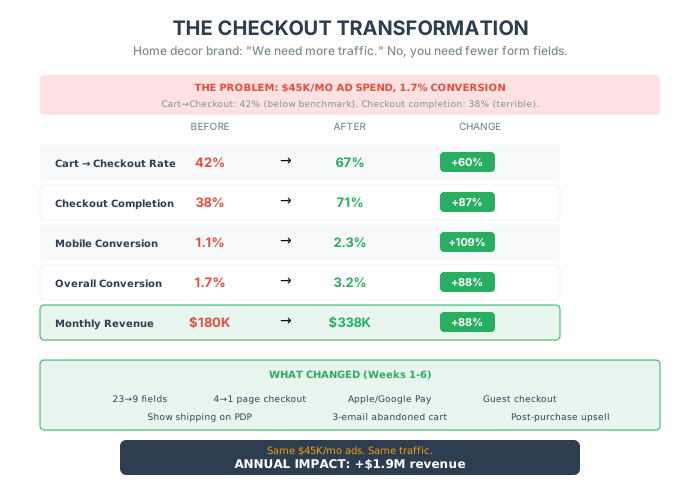
A home decor brand came to me with what they thought was a traffic problem. “We need more visitors,” they said.
The Situation
Section titled “The Situation”They were spending 180,000/month.
“Our ads are working. People are clicking. They’re just not buying.”
But when I looked at the funnel, the problem was obvious:
- Add to cart rate: 11% (good)
- Cart to checkout rate: 42% (🚨 below benchmark)
- Checkout completion rate: 38% (🚨 terrible)
- Overall conversion: 1.7%
They didn’t have a traffic problem. They had a checkout problem.
The Detection Phase
Section titled “The Detection Phase”We ran the Funnel Detection Protocol:
Conversion Waterfall Audit:
- Landing → Product: 44% (good)
- Product → Cart: 11% (good)
- Cart → Checkout Start: 42% (🚨 Red flag: below 45%)
- Checkout Start → Complete: 38% (🚨 Critical: below 50%)
Device Disparity Check:
- Desktop conversion: 2.4%
- Mobile conversion: 1.1% (🚨 46% of desktop)
- Mobile checkout time: 4.2 minutes (🚨 2x desktop)
Friction Point Analysis (20 sessions):
- 14 hesitated at shipping reveal (🚨)
- 11 clicked away to find discount codes (🚨)
- 8 abandoned at account creation (🚨)
- 6 couldn’t complete on mobile keyboard (🚨)
Checkout Field Audit:
- Required fields: 18 (🚨)
- Total fields: 23 (🚨)
- Included: company name, fax number, confirm email
The Intervention
Section titled “The Intervention”Week 1-2 (Quick Fixes):
- Cut form fields from 23 to 9
- Made account creation optional (post-purchase instead)
- Showed shipping estimate on product page
- Hid discount code field behind collapsible link
Week 3-4 (Medium Fixes):
- Collapsed 4-page checkout to 1 page
- Added Apple Pay and Google Pay above credit card
- Implemented sticky mobile “Complete Order” button
- Added progress indicator
Week 5-6 (Optimization):
- Set up 3-email abandoned cart sequence
- Added post-purchase upsell ($12 product for 30% off)
- Installed trust badges (Norton, money-back guarantee)
The Results
Section titled “The Results”| Metric | Before | After | Change |
|---|---|---|---|
| Cart → Checkout Rate | 42% | 67% | +60% |
| Checkout Completion | 38% | 71% | +87% |
| Mobile Conversion | 1.1% | 2.3% | +109% |
| Overall Conversion | 1.7% | 3.2% | +88% |
| Monthly Revenue | $180K | $338K | +88% |
Same traffic. Same ads. Same products.
Just a better checkout.
Monthly revenue increase: +1.9M Ad spend: Still $45,000/month (now generating 2x the revenue)
The Hidden Wins
Section titled “The Hidden Wins”Post-purchase upsell: 27% acceptance rate, adding $3.24 average to each order.
Abandoned cart recovery: Recovered 340 orders in the first month ($51,000 that would have been lost).
The Lesson
Section titled “The Lesson”They thought they needed more traffic. They needed fewer form fields.
Every dollar they spent on ads before was generating 7.50.
They didn’t need a bigger hose. They needed to stop the leaks.
The Bottom Line
Section titled “The Bottom Line”Your checkout is a funnel. And every step is a leak.
Most brands:
- 7 steps
- 23 form fields
- 69% abandonment
Optimized brands:
- 3 steps
- 9 form fields
- 45% abandonment
The difference? Millions of dollars.
Five things to do this week:
- Count your clicks – Cart to confirmation. If it’s more than 3, simplify.
- Cut form fields – Every field you remove = higher conversion.
- Test on mobile – 58% of purchases happen there. Make it work.
- Set up abandoned cart emails – The 3-email sequence. 1 hour, 24 hours, 72 hours.
- Add a progress indicator – Show customers where they are in the process.
You’ve already done the hard work. You got them to your site. You got them interested. You got them to add to cart.
Don’t lose them at the finish line.
In the next chapter, we’re diving into SEO and traffic—why obsessing over ads is costing you money, and how to fix your organic search instead.