

UX & Design
From mobile optimization to Black Friday preparation
“Design is not just what it looks like and feels like. Design is how it works.”
Steve Jobs
New entrepreneurs have what I call the Picasso Fallacy.
They think their website needs to be a work of art. They hire a “Creative Director.” They want swooshy animations. They want parallax scrolling. They want “Vibes.”
Stop it.
Art belongs in a museum. Your website belongs in a bank.
The goal of your design is not to get an award. The goal of your design is to get a credit card number.
Ugly acts. Pretty distracts. (Okay, it shouldn’t be ugly. But it should be boringly functional).
The UX Detection Protocol
Section titled “The UX Detection Protocol”Before you redesign anything, you need to diagnose where your UX is actually failing. Most brands skip this step and go straight to “make it look nicer.”
That’s like painting a car that won’t start.
Step 1: The Device Performance Audit
Section titled “Step 1: The Device Performance Audit”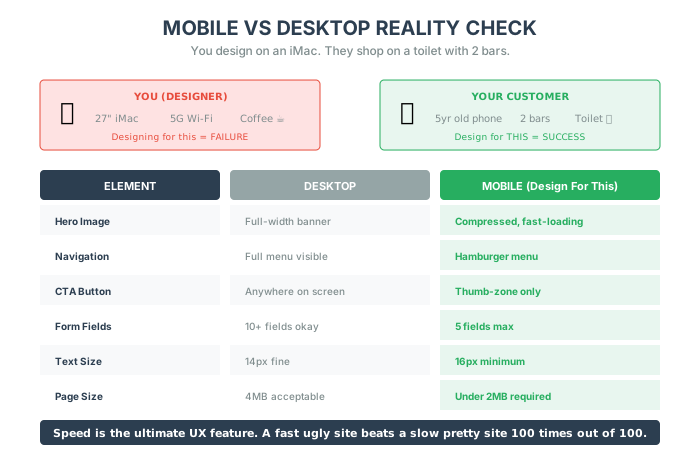
Pull your analytics. Fill in these numbers:
| Metric | Desktop | Mobile | 🚨 Red Flag If |
|---|---|---|---|
| Conversion Rate | ___% | ___% | Mobile < 50% of Desktop |
| Bounce Rate | ___% | ___% | Mobile > Desktop + 15% |
| Avg. Session Duration | ___min | ___min | Mobile < 50% of Desktop |
| Pages per Session | ___ | ___ | Mobile < Desktop - 1 |
If mobile is drastically underperforming desktop, you don’t have a “conversion problem”—you have a mobile UX problem.
Step 2: The Page Speed Reality Check
Section titled “Step 2: The Page Speed Reality Check”Run your homepage and top product page through Google PageSpeed Insights:
| Page | Mobile Score | Desktop Score | 🚨 Red Flag If |
|---|---|---|---|
| Homepage | ___ | ___ | Mobile < 50 |
| Top Product Page | ___ | ___ | Mobile < 50 |
| Checkout | ___ | ___ | Mobile < 60 |
🚨 Red Flag: If your mobile PageSpeed score is below 50, you’re losing 20-40% of mobile visitors before they even see your products.
Step 3: The Thumb Zone Audit
Section titled “Step 3: The Thumb Zone Audit”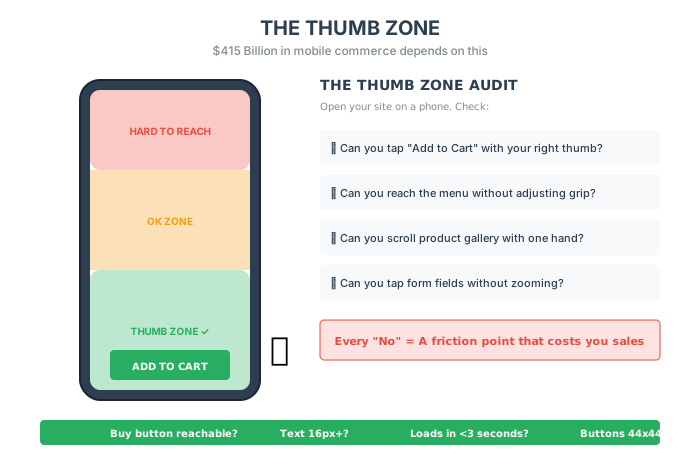
Open your site on a phone. Hold it naturally. Check:
- Can you tap “Add to Cart” with your right thumb?
- Can you reach the hamburger menu without adjusting your grip?
- Can you scroll through the product gallery with one hand?
- Can you tap form fields without zooming?
Every “No” is a friction point that costs you sales.
Step 4: The Rage Click Analysis
Section titled “Step 4: The Rage Click Analysis”Install a session recording tool (Hotjar, FullStory, or Clarity). Watch 20 mobile sessions and count:
| Rage Click Location | Count | Priority |
|---|---|---|
| Non-clickable elements | High | |
| Broken buttons | Critical | |
| Image gallery | Medium | |
| Navigation | High | |
| Forms | High |
Rage clicks are frustrated users telling you exactly where your UX sucks.
The 3-Tier UX Fix Framework
Section titled “The 3-Tier UX Fix Framework”Quick Fixes (This Week: 2-8 hours, 10-20% improvement)
Section titled “Quick Fixes (This Week: 2-8 hours, 10-20% improvement)”1. Enable Sticky Add-to-Cart on Mobile
When users scroll down to read reviews, they shouldn’t have to scroll back up to buy.
Add a sticky footer with the “Add to Cart” button. It stays visible as they scroll.
Time: 1-2 hours Expected lift: 8-15% add-to-cart improvement on mobile
2. Add Apple Pay / Google Pay Above Manual Entry
Put digital wallets first. Manual credit card entry second.
70% of mobile users have digital wallets set up. Let them use them.
Time: 1 hour (configuration) Expected lift: 10-15% mobile checkout completion improvement
3. Fix the Tap Target Problem
Every button on mobile should be at least 44x44 pixels. Run through your checkout on a phone. If you’re missing taps, the buttons are too small.
Time: 2-3 hours Expected lift: 5-10% form completion improvement
Medium Fixes (This Month: 1-3 weeks, 15-30% improvement)
Section titled “Medium Fixes (This Month: 1-3 weeks, 15-30% improvement)”1. Mobile Checkout Rebuild
Don’t optimize your desktop checkout for mobile. Rebuild it from scratch with:
- Single-column layout
- Numeric keyboard for phone/zip
- Auto-advancing fields
- Sticky order summary
- Express payment options above the fold
Time: 2-3 weeks Expected lift: 20-35% mobile checkout completion improvement
2. Product Page Information Architecture
Restructure your product page for how mobile users actually shop:
- Above fold: Hero image, price, key benefit, Add to Cart
- First scroll: Size guide, shipping info, returns policy
- Second scroll: Product details, specs
- Third scroll: Reviews (with summary stats visible)
Time: 1-2 weeks Expected lift: 10-20% add-to-cart improvement
3. Lazy Loading + Image Optimization
Compress all images to WebP format. Implement lazy loading for everything below the fold.
Time: 1 week Expected lift: 20-40% improvement in page load speed, 5-10% conversion lift
Deep Fixes (This Quarter: 4-8 weeks, 25-50%+ improvement)
Section titled “Deep Fixes (This Quarter: 4-8 weeks, 25-50%+ improvement)”1. Full Mobile-First Redesign
Stop adapting desktop for mobile. Design mobile-first, then scale up.
This means:
- Mobile wireframes before desktop
- Thumb-zone-first interaction design
- Performance budget baked into design specs
- Mobile QA as the primary test environment
Time: 6-8 weeks Expected lift: 30-50% mobile conversion improvement
2. Progressive Web App (PWA) Implementation
PWAs load instantly on return visits and can work offline. For mobile-heavy brands, this is a game-changer.
Benefits:
- Instant load on repeat visits
- “Add to Home Screen” functionality
- Offline product browsing
- Push notification capability
Time: 6-8 weeks Expected lift: 25-40% improvement in mobile return visitor conversion
3. Personalized UX Based on Behavior
Different users need different experiences:
- New visitors: Hero explains who you are and why they should care
- Returning browsers: Show recently viewed products
- Repeat customers: Jump straight to new arrivals or reorder
Time: 6-8 weeks Expected lift: 20-35% overall conversion improvement
Mobile Is The Default (The $415 Billion Thumb)
Section titled “Mobile Is The Default (The $415 Billion Thumb)”Here is a hard truth. You are designing your website on a 27-inch iMac with 5G Wi-Fi. Your customer is looking at your website on a 5-year-old iPhone while sitting on the toilet with 2 bars of service.
If you design for the iMac, you lose.
According to Insider Intelligence, 2023 global mcommerce sales reached $415.93 billion, accounting for 6% of retail sales. And that number keeps climbing.
You need to design for the Thumb Zone.
- Can I reach the “Buy” button with my right thumb?
- Is the text big enough to read without squinting?
- Does it load in under 3 seconds?
If the answer is “No,” you are burning cash.
The Mobile vs. Desktop Reality Check:
| Element | Desktop | Mobile |
|---|---|---|
| Hero Image | Full-width banner | Compressed, fast-loading |
| Navigation | Full menu visible | Hamburger menu |
| CTA Button | Anywhere on screen | Thumb-zone only |
| Form Fields | 10+ fields okay | 5 fields max |
| Text Size | 14px fine | 16px minimum |
| Page Size | 4MB acceptable | Under 2MB required |
Speed is the ultimate UX feature. A fast ugly site beats a slow pretty site 100 times out of 100.
The Mobile-First Design Checklist
Section titled “The Mobile-First Design Checklist”With mobile driving an increasingly large share of transactions, your website layout should cater to smartphone shoppers as the default. You can then scale up elements for desktop after.
Best practices for mobile-friendly landing pages:
- Use a simple, decluttered layout with lots of white space
- Make tap targets large and buttons easy to press
- Allow for one column scrolling with key info “above the fold”
- Include large text and images
- Keep page size under 2MB
- Position menus fixed at the top or bottom for persistent access
Streamlining page elements for mobile removes distractions and drives conversions.
Optimize Navigation Menus
Section titled “Optimize Navigation Menus”The small screen real estate on mobile makes your navigation critical. Menus should be simple and streamlined.
Tips for mobile navigation:
- Prioritize primary categories in the main menu
- Use accordion-style collapsible menus for secondary pages
- Include search bars and account icons for easy access
- Remove unnecessary links to declutter
- Test different menu styles to see what works for your customers
Personalize for Micro-Moments
Section titled “Personalize for Micro-Moments”People engage with their smartphones in shorter sessions throughout the day. These “micro-moments” change the context of the mobile shopping experience.
Your customer is distracted. They are in a “Micro-Moment.” They have 3 minutes before their Uber arrives. They are bored. They see your ad. They want to buy.
Do not make them work for it.
When someone reaches for their phone to shop, they likely have a specific intent:
- Killing time on a commute and browsing products visually
- Researching a particular item quickly while in a store
- Comparing prices before making an impulse purchase
Your website copy and content should align with these motivating factors. Include clear calls-to-action so people can seamlessly transition from browsing to buying.
The Micro-Moment Toolkit
Section titled “The Micro-Moment Toolkit”1. Autofill Everything If they have to type their address manually, you lost them. Leverage autofill and digital wallets.
2. One-Click Pay Apple Pay. Google Pay. Shop Pay. If I have to get off the couch to find my wallet, I am not buying.
3. The Big Button Make the CTA button a contrasting color. Make it huge. Do not be subtle.
4. Guest Checkout Allow guest checkout options to avoid forced account registration. Mobile users don’t want to create yet another account.
5. Responsive Form Validation Use real-time validation to avoid errors when tapping on small inputs. Nothing kills a sale like a confusing error message.
The Channel Diversification Imperative
Section titled “The Channel Diversification Imperative”I spoke with a founder last month who said, “TikTok is crushing it for us right now.”
Great. But here’s the problem: Every acquisition channel eventually plateaus.
It doesn’t matter if it’s TikTok, Meta, email, affiliates, or SEO. The nature of channels is that they get crowded, expensive, or over-optimized.
Why Channels Plateau:
- Costs rise as competition increases. Your once-affordable CAC creeps up because everyone else figured out the same playbook.
- Fatigue sets in. Even the best-performing creative gets stale. Audiences get numb to your ads.
- Platform dynamics shift. Algorithms change. What worked six months ago doesn’t work today.
- Market saturation. Your total addressable audience on that platform gets capped.
This isn’t fear-mongering—it’s math. A single channel might carry you for a season. But if it’s your only growth engine, your business is running on borrowed time.
The Fix: The Channel Portfolio
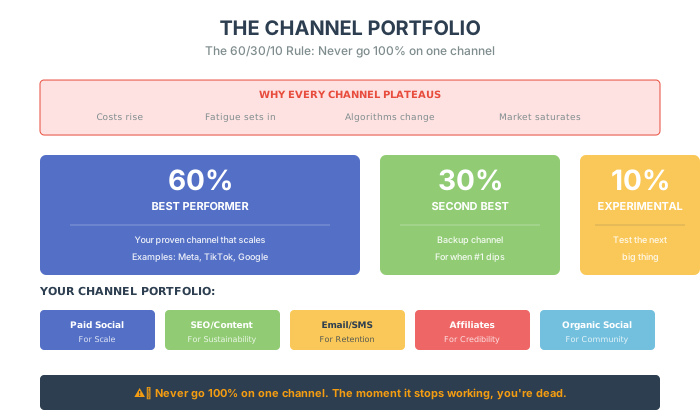
Don’t put all your eggs in one basket. Build a portfolio:
- Paid Social (Meta, TikTok) – For scale
- SEO/Content – For sustainability
- Email/SMS – For retention
- Affiliates/Influencers – For credibility
- Organic Social – For community
When one channel dips, another picks up the slack.
The 60/30/10 Rule:
- 60% of budget on your best-performing channel
- 30% on your second-best channel
- 10% on experimental channels (testing the next thing)
Never go 100% on one channel. The moment it stops working, you’re dead.
Build Systems, Not Just Campaigns
Section titled “Build Systems, Not Just Campaigns”The brands that break through stop thinking about “channels” and start thinking about systems.
Campaigns are temporary. Systems are designed to compound. Think:
- A quiz funnel that collects email + SMS before purchase
- A welcome series that converts new subscribers on autopilot
- A UGC pipeline that refreshes your ad creative weekly
Looking Expensive For Cheap
Section titled “Looking Expensive For Cheap”“But Alex, I want a premium brand! I need a $10,000 photoshoot!”
No, you don’t. In fact, high-gloss studio photos are converting worse today than they did 5 years ago. Why? Because they scream “Advertising.”
We want Authenticity.
Humans are visual creatures. We process images 60,000 times faster than text. But the type of imagery matters.
1. The Lifestyle Hack Don’t shoot your product on a white background. Shoot it on a kitchen counter. Shoot it in the gym. Shoot it in the mud. Context creates value. A 20 watch on a hairy wrist climbing a mountain looks like a $200 watch.
2. The 15-Second Video You don’t need a film crew. You need an iPhone. Show the product. Spin it around. Open the box. A 15-second unboxing clip answers 50 questions that text never could. “How big is it? Is it shiny? Does the lid snap shut?” Show, don’t tell.
3. User-Generated Content (The Holy Grail) A professional photo of your product is an “Ad.” A blurry photo of a customer holding your product is “Proof.”
Incentivize customers to post photos. Reshare them. Feature them on product pages. Real humans using your product beats any studio shot.
The Gen Z Playbook
Section titled “The Gen Z Playbook”If you’re selling to anyone under 30, you need a different strategy.
Gen Z doesn’t trust traditional advertising. Their BS meters are finely tuned. But 39% of Gen Z clothing buyers discovered new brands through social media in the last 6 months.
Capturing their attention is no easy feat. Their standards are high, their social media savviness unparalleled. But the rewards for those who authentically connect with this generation are great.
Tactic 1: Micro-Influencers Over Celebrities
Gen Z cares far more about what “people like me” think compared to celebrities.
Partner with influencers who have 10-100K engaged followers. They’re cheaper, more authentic, and convert better than mega-influencers.
- Offer free products in exchange for organic-feeling posts
- Require trackable links to measure conversions
- Look for influencers who already love your brand aesthetic
Micro-influencer marketing ticks all the boxes for Gen Z: social proof from people they trust, mixed with inspiration for styling products in their daily lives.
Tactic 2: Social Commerce Integration
Instagram and TikTok have embedded shopping. Use it.
- Create video and image content specifically tailored to mobile feeds
- Use shoppable stickers and tags
- A/B test captions, promotions, and CTAs continuously
- Collaborate with creators to develop shoppable content
Tactic 3: Make UGC The Hero
Gen Z trusts peer content over brand content. Build your product pages around customer photos and videos. Feature reviews prominently.
Contests that encourage users to style and showcase your products can unlock amazing organic content. Offer prizes and reposts to fuel participation.
Let their creative images and videos highlight your products in aspirational and relatable ways organic branded content often misses.
The Black Friday Battle Plan
Section titled “The Black Friday Battle Plan”Black Friday is the Super Bowl of e-commerce. You don’t wing it.
The Preparation Phase (Weeks Before):
- Load test your site. If it crashes on the biggest sales day, you lose everything.
- Simplify your offer. One clear promotion beats 10 confusing ones.
- Warm up your list. Teaser emails build anticipation.
- Stock up. Nothing kills momentum like “Out of Stock.”
Build Anticipation Through Storytelling
Section titled “Build Anticipation Through Storytelling”In the weeks leading up to Black Friday, unleash teaser campaigns across email, social media, and influencer partnerships.
- Craft engaging narratives across channels. Teasers and email campaigns build momentum.
- Establish emotional connections through visual storytelling.
- Share behind-the-scenes exclusives. Give sneak peeks into new collections.
Promotion Architecture:
Tiered deals work best:
- “Spend 10”
- “Spend 30”
- “Spend 75”
This makes customers feel like they’re earning a bigger reward by spending more. Average Order Value goes up. Exclusive discounts for loyalty members also build goodwill.
The FOMO Stack:
- Countdown timers – “Sale ends in 3 hours”
- Stock indicators – “Only 12 left”
- Live activity – “47 people viewing this right now”
Personalize the Customer Journey
Section titled “Personalize the Customer Journey”Use data and customization to make each shopper feel special.
- Use data to recommend relevant products based on past purchases
- Offer self-service customization
- Provide personalized support and VIP treatment
Harness Data, Then Take Action
Section titled “Harness Data, Then Take Action”Continuous analysis and testing is crucial. Monitor performance daily, learn from test results, and fine-tune your strategy.
- Analyze past performance to identify what works
- Stay on top of consumer trends
- Continuously test and optimize
Post-Sale:
The week after Black Friday matters too.
- Send “Last Chance” emails to cart abandoners
- Offer a “Cyber Monday Exclusive” for email subscribers
- Thank buyers with a surprise discount on their next order
Black Friday is a sprint. But the winners are the ones who planned like it was a marathon.
The Site Overhaul Budget (The 4-Bucket Framework)
Section titled “The Site Overhaul Budget (The 4-Bucket Framework)”Planning a site redesign? Most brands get destroyed by scope creep.
Redesigning your e-commerce site can feel like renovating a house. It’s exciting. It’s full of potential. But it can also become a chaotic money pit if you don’t plan for what actually matters.
I’ve seen it happen: a brand sets a 135K and are still scrambling to get core features working. Why? Because the plan was surface-level.
What gets overlooked in almost every redesign:
- Backend functionality
- SEO preservation
- Migration planning
- UX strategy rooted in data, not opinion
- Redirect mapping and URL structure
- Performance optimization
Use the 4-Bucket Budget to stay sane:
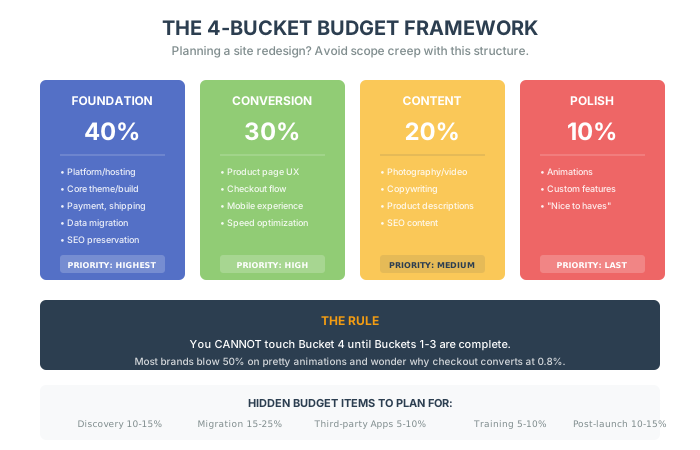
Bucket 1: Foundation (40% of budget)
- Platform/hosting
- Core theme or custom build
- Essential integrations (payment, shipping)
- Data migration and SEO preservation
Bucket 2: Conversion (30% of budget)
- Product page optimization
- Checkout flow
- Mobile experience
- Speed optimization
Bucket 3: Content (20% of budget)
- Photography/video
- Copywriting
- Product descriptions
- SEO content
Bucket 4: Polish (10% of budget)
- Animations
- Custom features
- “Nice to haves”
The rule: You cannot touch Bucket 4 until Buckets 1-3 are complete.
Most brands blow 50% of their budget on pretty animations (Bucket 4) and wonder why their checkout converts at 0.8%.
Foundation first. Polish last.
The Hidden Budget Items
Section titled “The Hidden Budget Items”Your budget should include more than just development costs. Here are the items that catch you off guard:
- Discovery and Strategy (10-15%) – User research, site architecture, feature requirements
- Data Migration (15-25%) – Cleaning and transferring customer data, order history, SEO value
- Third-Party Apps (5-10%) – Recurring costs for apps that replace custom features
- Training and Rollout (5-10%) – Your team needs to learn the new system
- Post-Launch Optimization (10-15%) – Bug fixes, speed optimization, adjustments
My advice: Your budget isn’t just for the build. It’s for the unknowns. Plan for them.
The 5 Tactics To Stand Out On A Budget
Section titled “The 5 Tactics To Stand Out On A Budget”You don’t need millions to look like a million-dollar brand.
1. Custom Thank-You Page Instead of a generic “Order Confirmed,” add:
- A personalized message
- Social share buttons
- A 10% off code for their next order
- A referral link
2. Micro-Animations That Matter Skip the parallax scrolling. Add a satisfying bounce when someone adds to cart. Add a subtle color change when a button is hovered. Small. Functional. Delightful.
3. Photography Consistency Same lighting. Same angles. Same background. Consistency signals professionalism more than expensive gear.
4. Curated Collections Don’t just organize by category. Create collections like:
- “Staff Picks”
- “Best for First-Timers”
- “Under $50”
It guides decision-making and reduces cognitive load.
5. The “About Us” Humanization Show real faces. Tell a real story. On your About page, open up about the inspirational beginnings of your business. This vulnerability gets visitors invested.
The Unboxing Experience
Section titled “The Unboxing Experience”Unboxing videos generate billions of views on YouTube. Tap into this phenomenon by orchestrating delightful surprises.
Gift Free Samples Tuck single-use product samples into packages. These let customers test new items at no cost to you. Include a coupon to incentivize reorders.
Handwrite Thank You Notes As online communication grows impersonal, a handwritten message stands out. Jot a quick thanks to every customer for supporting your small business.
Wrap with Branded Tissue Skip boring brown packing material. Line boxes with lightweight branded tissue paper. It’s inexpensive and transforms the unboxing into a festive reveal.
Spotlight Values and Causes
Section titled “Spotlight Values and Causes”Modern consumers care about the values behind brands they support.
Share Supplier Stories If materials are ethically sourced or products handmade, put that craftsmanship center stage.
Highlight Sustainability Efforts Call out eco-friendly shipping materials and green initiatives.
Support Nonprofits Partner with a charity that aligns with your mission. Feature it prominently and donate a portion of proceeds.
The Bottom Line
Section titled “The Bottom Line”Design isn’t about colors. It is about removing friction. It is about respecting the user’s laziness.
If you make it easy, they will buy. If you make it pretty but hard, they will leave.
The Design Equation:
- Mobile-first > Desktop-first
- Speed > Beauty
- Authenticity > Polish
- Systems > Campaigns
- Channel diversity > Channel dependence
Case Study: The Mobile-First Transformation
Section titled “Case Study: The Mobile-First Transformation”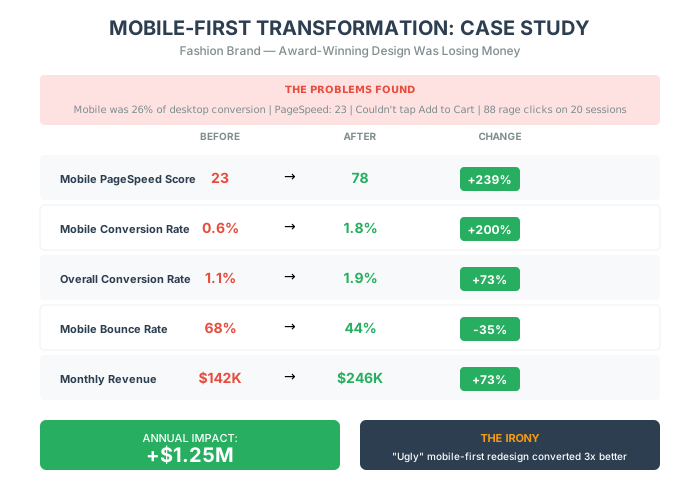
A fashion brand came to me with a beautiful website. Stunning photography. Smooth animations. Their designer won an award.
They were losing money.
The Situation
Section titled “The Situation”Their numbers told a brutal story:
- Overall conversion rate: 1.1%
- Desktop conversion: 2.3%
- Mobile conversion: 0.6%
- Mobile traffic share: 74%
They’d spent $85,000 on a redesign that prioritized aesthetics over usability. The designer worked on a 27-inch monitor. Their customers shopped on 5-year-old phones.
The Detection Phase
Section titled “The Detection Phase”We ran the detection protocol:
Device Performance Audit:
- Mobile conversion was 26% of desktop (🚨 Red flag: below 50%)
- Mobile bounce rate was 68% vs. 42% desktop (🚨 Red flag: 26% higher)
- Mobile PageSpeed score: 23 (🚨 Critical)
Thumb Zone Audit:
- Add to Cart button required two-hand grip to reach
- Size selector was too small to tap accurately
- Product images couldn’t be zoomed with pinch gesture
Rage Click Analysis (20 sessions):
- 47 rage clicks on product images (expected zoom, got nothing)
- 23 rage clicks on size selector
- 18 rage clicks on non-functional “Quick View” buttons
The Intervention
Section titled “The Intervention”Week 1-2 (Quick Fixes):
- Enabled sticky Add to Cart on mobile
- Added Apple Pay / Google Pay above manual entry
- Increased all tap targets to 44x44px minimum
Week 3-6 (Medium Fixes):
- Rebuilt mobile checkout from scratch (single-column, auto-advancing fields)
- Restructured product page information architecture
- Compressed all images to WebP, implemented lazy loading
Week 7-12 (Deep Fix):
- Full mobile-first redesign (killed the award-winning animations)
- Implemented behavior-based personalization for returning visitors
The Results
Section titled “The Results”| Metric | Before | After | Change |
|---|---|---|---|
| Mobile PageSpeed Score | 23 | 78 | +239% |
| Mobile Conversion Rate | 0.6% | 1.8% | +200% |
| Overall Conversion Rate | 1.1% | 1.9% | +73% |
| Mobile Bounce Rate | 68% | 44% | -35% |
| Monthly Revenue | $142,000 | $246,000 | +73% |
Annual revenue impact: +$1.25M
The irony? The “ugly” mobile-first redesign converted 3x better than the award-winning original.
The Lesson
Section titled “The Lesson”Pretty sites win awards. Fast, functional sites win customers.
Their designer’s beautiful animations were loading at 6 seconds on real devices. We killed the animations and dropped it to 1.8 seconds.
The customers noticed. The awards committee didn’t.
Five Things To Do This Week:
- Test your site on a 4-year-old phone. Is it fast? Is it usable?
- Audit your channel mix. Are you 100% dependent on one platform?
- Add one UGC photo to your top product page.
- Check your thumb zone. Can I reach the Buy button with my thumb?
- Simplify your next promotion. One offer. One deadline. One CTA.
Be useful. Be fast. Be rich.
This concludes Part I: Foundations of Behavior. You now understand the Brain of your customer. In Part II, we are going to dive into the Strategic Frameworks needed to turn that understanding into profit.