

CRO & Testing
The scientific method applied to sales
“Measurement is the first step that leads to control and eventually to improvement. If you can’t measure something, you can’t understand it. If you can’t understand it, you can’t control it. If you can’t control it, you can’t improve it.”
H. James Harrington
I was in a marketing meeting watching a team celebrate.
They’d just run an A/B test. The winner? Changing a button from “Buy Now” to “Shop Now.”
The lift? 0.6%.
They were popping champagne.
I asked one question: “How much is that worth in revenue?”
Silence.
“Well, we get about 10,000 sessions a month, and our conversion rate is 2%, so that’s 200 orders. A 0.6% lift is… uh… 1.2 more orders per month?”
“And your average order value?”
“$85.”
So they just spent three weeks, two engineers, one designer, and God knows how many Slack messages to make an extra $102 per month.
That’s $1,224 per year.
Minus the cost of running the test, the opportunity cost of not working on something that matters, and the technical debt from maintaining two button variants in the codebase.
They lost money celebrating.
This is the A/B testing trap. And 90% of e-commerce brands are stuck in it.
They’re testing the wrong things. At the wrong scale. For the wrong reasons.
Let me show you what’s actually worth testing.
The CRO Detection Protocol
Section titled “The CRO Detection Protocol”Before you run a single test, you need to know where the real problems are. Most teams skip this step and go straight to testing button colors.
That’s like trying to fix a car without opening the hood.
Here’s how to diagnose your actual CRO issues:
Step 1: The Funnel Bleed Audit
Section titled “Step 1: The Funnel Bleed Audit”Open your analytics and answer these questions:
| Stage | Your Rate | Benchmark | 🚨 Red Flag If |
|---|---|---|---|
| Homepage → Product Page | ___% | 35-45% | Below 25% |
| Product Page → Add to Cart | ___% | 8-12% | Below 5% |
| Add to Cart → Checkout | ___% | 55-65% | Below 45% |
| Checkout → Purchase | ___% | 45-55% | Below 35% |
If any number is in the red flag zone, stop testing and start fixing.
Step 2: The Device Split Reality Check
Section titled “Step 2: The Device Split Reality Check”Pull your conversion rate by device:
- Desktop: ____%
- Mobile: ____%
- Tablet: ____%
🚨 Red Flag: If mobile conversion is less than 50% of desktop, you have a mobile problem—not a testing problem.
I’ve seen brands spend months A/B testing desktop headlines while 70% of their traffic (mobile) was converting at 0.8%. They were optimizing the wrong thing entirely.
Step 3: The Traffic Quality Audit
Section titled “Step 3: The Traffic Quality Audit”Not all traffic is equal. Check your conversion rate by source:
| Source | Sessions | Conversion Rate | Revenue/Session |
|---|---|---|---|
| Organic Search | |||
| Paid Search (Brand) | |||
| Paid Search (Non-Brand) | |||
| Social (Organic) | |||
| Social (Paid) | |||
| Direct |
🚨 Red Flag: If your paid non-brand traffic converts at less than 1/3 of your email traffic, you might have an audience mismatch—not a conversion problem.
Step 4: The Session Recording Reality
Section titled “Step 4: The Session Recording Reality”Watch 20 sessions of users who abandoned:
- At product page
- At cart
- At checkout
Count the friction patterns:
| Friction Type | Occurrences | Priority |
|---|---|---|
| Rage clicks | High | |
| Scroll confusion | Medium | |
| Form errors | High | |
| Back button usage | Medium | |
| Long pauses | Medium |
This tells you what to fix before you test how to fix it.
The A/B Testing Lie
Section titled “The A/B Testing Lie”Here’s what nobody tells you about A/B testing:
Most tests are statistically meaningless.
You need massive traffic to detect small changes. And small changes don’t move the needle anyway.
Let’s do the math.
The Statistical Significance Trap
Section titled “The Statistical Significance Trap”To run a valid A/B test with a 0.5% lift, you need:
- Minimum 10,000 conversions per variant to reach 95% statistical significance
- At 2% conversion rate, that’s 500,000 visitors per variant
- That’s 1,000,000 total visitors
How many e-commerce sites get a million visitors per test?
Not many.
But everyone’s running tests anyway. And calling them “wins.”
That’s not science. That’s astrology.
Pro Tip: The 5% Rule
If your test can’t realistically move revenue by at least 5%, don’t run it. The juice isn’t worth the squeeze.
A 0.6% button color change? Skip it. A complete checkout redesign that could cut abandonment by 15%? Now we’re talking.
The 3-Tier CRO Fix Framework
Section titled “The 3-Tier CRO Fix Framework”Once you’ve diagnosed where the problems are, here’s how to fix them—organized by effort and impact.
Quick Fixes (This Week: 2-8 hours, 10-20% impact)
Section titled “Quick Fixes (This Week: 2-8 hours, 10-20% impact)”1. Add Trust Signals to High-Drop Pages
If your product page → cart drop is above 90%, add these immediately:
- Review count and star rating above the fold
- “X people bought this today” social proof
- Trust badges near the Add to Cart button
- Clear return policy one-liner
Time: 2 hours Expected lift: 8-15% add-to-cart improvement
2. Fix the Shipping Surprise
If your cart → checkout drop is above 60%, shipping cost surprise is likely the culprit.
Show estimated shipping on the product page. Not the cart. The product page.
Time: 1-2 hours Expected lift: 10-15% cart-to-checkout improvement
3. Enable Guest Checkout (If You Haven’t)
Force account creation = 23% of abandonments (Baymard Institute).
Make “Guest Checkout” the default option. Move account creation to post-purchase.
Time: 1 hour (configuration change) Expected lift: 10-20% checkout completion improvement
Medium Fixes (This Month: 1-3 weeks, 15-30% impact)
Section titled “Medium Fixes (This Month: 1-3 weeks, 15-30% impact)”1. Implement Single-Page Checkout
Multi-step checkouts lose people at every step. The math is brutal:
- Step 1 → Step 2: 15% drop
- Step 2 → Step 3: 12% drop
- Step 3 → Step 4: 10% drop
Compound that: 0.85 × 0.88 × 0.90 = 67% completion rate at best.
Single-page checkout can push this to 80%+.
Time: 1-2 weeks Expected lift: 15-25% checkout completion improvement
2. Mobile Checkout Overhaul
Don’t “optimize” mobile. Rebuild it.
The mobile checkout needs:
- Sticky cart summary
- Numeric keyboard for phone/zip
- Apple Pay / Google Pay above manual entry
- Progress saved automatically (they WILL get interrupted)
Time: 2-3 weeks Expected lift: 20-35% mobile conversion improvement
3. Product Page Information Architecture
Reorganize based on what people actually need to decide:
- Above fold: Image, price, key benefit, reviews summary, Add to Cart
- First scroll: Size guide, shipping info, returns
- Second scroll: Full description, specs, related products
Time: 1-2 weeks Expected lift: 10-20% add-to-cart improvement
Deep Fixes (This Quarter: 4-8 weeks, 25-50%+ impact)
Section titled “Deep Fixes (This Quarter: 4-8 weeks, 25-50%+ impact)”1. Personalization Engine
Stop showing the same homepage to everyone.
Build segments based on:
- Traffic source (paid vs. organic)
- Visit count (new vs. returning)
- Previous browse behavior
- Purchase history
Then customize:
- Homepage hero
- Product recommendations
- Email capture offer
- Exit intent message
Time: 6-8 weeks Expected lift: 25-40% overall conversion improvement
2. Full Funnel Rebuild
Sometimes you need to blow it up and start over.
Signs you need this:
- Conversion rate hasn’t moved in 12+ months
- Mobile is less than 40% of desktop conversion
- Bounce rate above 60% sitewide
- Time to first conversion is growing
This is a major project—but the brands that do it see transformational results.
Time: 8-12 weeks Expected lift: 40-100%+ conversion improvement
3. Post-Purchase Optimization
CRO doesn’t end at checkout. The moments after purchase are goldmines:
- Order confirmation page upsells
- Post-purchase email sequence (review request, cross-sell, referral)
- Delivery experience optimization
Time: 4-6 weeks Expected lift: 15-30% LTV improvement (indirect conversion impact)
What Actually Matters
Section titled “What Actually Matters”I’ve run tests on sites doing 50M/month. Here’s what I’ve learned:
The biggest wins don’t come from A/B tests. They come from fixing broken shit.
Let me explain.
The Optimization Hierarchy
Section titled “The Optimization Hierarchy”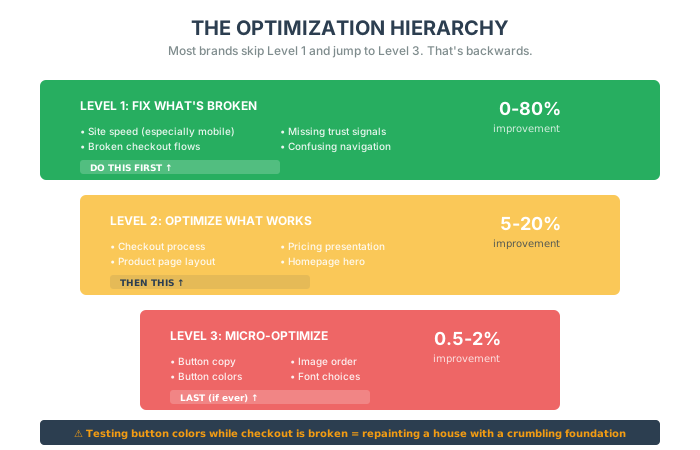
Level 1: Fix What’s Broken (0-80% improvement)
- Site speed (especially mobile)
- Broken checkout flows
- Missing trust signals
- Confusing navigation
Level 2: Optimize What Works (5-20% improvement)
- Checkout process
- Product page layout
- Pricing presentation
- Homepage hero
Level 3: Micro-Optimize (0.5-2% improvement)
- Button copy
- Button colors
- Image order
- Font choices
Most brands skip Level 1 and jump straight to Level 3.
That’s like repainting your house while the foundation is crumbling.
The Tests That Actually Work
Section titled “The Tests That Actually Work”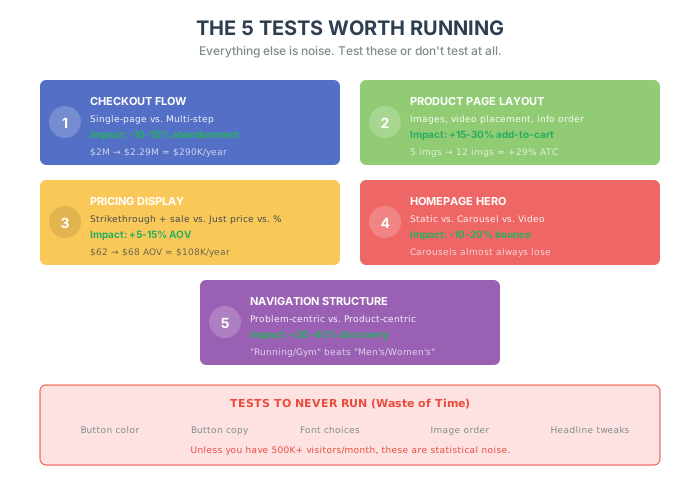
Here are the only 5 A/B tests worth running. Everything else is noise.
Test #1: Checkout Flow (Single-Page vs. Multi-Step)
Section titled “Test #1: Checkout Flow (Single-Page vs. Multi-Step)”Why It Matters:
Checkout abandonment averages 70% [source]. That means for every 10 people who add to cart, 7 leave.
If you fix nothing else, fix this.
The Test:
Variant A (Control): Multi-step checkout
- Step 1: Shipping info
- Step 2: Payment info
- Step 3: Review order
- Step 4: Confirmation
Variant B: Single-page checkout
- Everything on one page with a progress indicator
What I’ve Seen:
Single-page checkouts typically convert 10-15% better if you have:
- Low AOV (under $100)
- Returning customers
- Mobile-heavy traffic
Multi-step works better if you have:
- High AOV ($200+)
- Complex products
- B2B customers
The Numbers:
I ran this test for a client doing $2M/year.
- Control: 2.1% conversion, 68% cart abandonment
- Winner (Single-Page): 2.4% conversion, 61% cart abandonment
Revenue impact: 2.29M = $290,000/year
That’s worth testing.
Test #2: Product Page Layout (Image-Left vs. Image-Right)
Section titled “Test #2: Product Page Layout (Image-Left vs. Image-Right)”Why It Matters:
Your product page is where purchase decisions happen. But most product pages are designed by people who’ve never bought anything online.
The Test:
Variant A: Images on left, details on right (standard) Variant B: Images on right, details on left Variant C: Images on top, details below (mobile-first)
What I’ve Seen:
This is weirdly industry-specific.
- Fashion/Apparel: Images-left wins (Western reading pattern)
- Electronics: Images-right wins (specs matter more than visuals)
- Home goods: Images-top wins (mobile is 70% of traffic)
The Real Test (That Nobody Runs):
Don’t test left vs. right. Test:
- Number of images (5 vs. 10 vs. 20)
- Image type (lifestyle vs. white background)
- Video placement (above fold vs. in gallery)
The Numbers:
A fashion client tested 5 images vs. 12 images.
- Control (5 images): 2.8% add-to-cart rate
- Winner (12 images): 3.6% add-to-cart rate
Why? More angles = fewer returns. Customers felt confident.
Revenue impact: 29% increase in add-to-cart rate = $180,000/year
Test #3: Pricing Display (Full Price + Discount vs. Just Sale Price)
Section titled “Test #3: Pricing Display (Full Price + Discount vs. Just Sale Price)”Why It Matters:
The way you show price affects perceived value. And perceived value drives conversions.
The Test:
Variant A: Show full price with strikethrough + sale price
- ~~89.99** (Save $40!)
Variant B: Just show sale price
- $89.99
Variant C: Show percentage discount
- $89.99 (31% OFF)
What I’ve Seen:
This is wildly dependent on your customer.
- Discount shoppers: Variant A wins (they want to see the “deal”)
- Premium buyers: Variant B wins (discounts cheapen the brand)
- First-time visitors: Variant C wins (percentage feels bigger)
The Numbers:
I ran this for a supplement brand.
- Control (Just Sale Price): $62 AOV
- Winner (Full Price + Discount): $68 AOV
Why? The anchor effect. Showing the 68 feel like a steal.
Revenue impact: 68 AOV on 1,500 orders/month = $108,000/year
Pro Tip: The Anchor Hack
Always show a higher “compare at” price. Even if you never actually sold it at that price. Just make sure it’s defensible.
Example: “MSRP: $129” (Manufacturer’s Suggested Retail Price). You’re not lying. You’re anchoring.
Test #4: Homepage Hero (Static Image vs. Carousel vs. Video)
Section titled “Test #4: Homepage Hero (Static Image vs. Carousel vs. Video)”Why It Matters:
Your homepage is not a branding exercise. It’s a sorting mechanism.
People land on your homepage and ask: “Is this for me?”
You have 3 seconds to answer.
The Test:
Variant A: Static hero image with CTA Variant B: 3-image carousel Variant C: Auto-play background video
What I’ve Seen:
Carousels almost always lose. Here’s why:
- 89% of users never click past slide 1 [source]
- They slow down page load
- They confuse the message
Static images win if you have:
- One clear value prop
- One target customer
- One primary CTA
Videos win if you have:
- A complex product
- High AOV ($500+)
- Engaged traffic (email, retargeting)
The Numbers:
A home goods brand tested static vs. carousel.
- Control (Carousel): 32% bounce rate, 1.1 pages/session
- Winner (Static): 26% bounce rate, 1.8 pages/session
Why? Carousels create decision paralysis. Static images create clarity.
Bounce rate drop: 32% → 26% = 19% more people stayed on site
Test #5: Navigation Menu (Dropdown vs. Mega Menu)
Section titled “Test #5: Navigation Menu (Dropdown vs. Mega Menu)”Why It Matters:
If people can’t find your product, they can’t buy it.
Navigation is the highway system of your site. Bad navigation = traffic jams = lost sales.
The Test:
Variant A (Dropdown): Hover to reveal categories Variant B (Mega Menu): Click to reveal full grid of options
What I’ve Seen:
- Small catalogs (<50 products): Dropdown wins
- Large catalogs (>50 products): Search + Mega Menu wins
- Mobile: Neither. Use a search-first approach.
The Real Insight:
Most navigation sucks because it’s organized by how you think about your inventory, not how customers think about their problem.
Bad Navigation (Product-Centric):
- Men’s
- Women’s
- Kids
- Sale
Good Navigation (Problem-Centric):
- Running
- Gym
- Yoga
- Outdoor
The Numbers:
A sports brand tested product-centric vs. problem-centric nav.
- Control (Men’s/Women’s): 12% used navigation, 88% used search
- Winner (Running/Gym/Yoga): 31% used navigation, 69% used search
Why? People shop by activity, not by gender.
Search dependence dropped 19%, which meant faster path to product, which meant higher conversion.
The Tests You Should Never Run
Section titled “The Tests You Should Never Run”Here’s my blacklist. If you’re testing any of these, stop immediately.
1. Button Color (Red vs. Green vs. Blue)
Section titled “1. Button Color (Red vs. Green vs. Blue)”Unless you have 500,000+ visitors/month, this is noise.
The difference between a red and green button is <0.5%. And it’s not replicable across audiences.
2. Button Copy (“Buy Now” vs. “Add to Cart” vs. “Shop Now”)
Section titled “2. Button Copy (“Buy Now” vs. “Add to Cart” vs. “Shop Now”)”Same problem. Tiny lift. Not worth the engineering cost.
3. Font Choices
Section titled “3. Font Choices”Unless your font is illegible, this doesn’t matter. People don’t care if you use Helvetica or Arial.
4. Image Order in Gallery
Section titled “4. Image Order in Gallery”“Should the lifestyle shot be first or third?”
Nobody cares. Test something that matters.
5. Headline Copy Variations
Section titled “5. Headline Copy Variations”“Premium Quality Supplements” vs. “High-Quality Supplements”
This is content marketing, not conversion optimization. Save it for your blog.
The Copywriting Lever (That Nobody Uses)
Section titled “The Copywriting Lever (That Nobody Uses)”Want to know the fastest way to increase conversions that doesn’t require a single A/B test?
Write better copy.
I’m not talking about testing “Buy Now” vs. “Shop Now.” I’m talking about fundamentally changing how you communicate value.
The Benefits-Over-Features Rule
Section titled “The Benefits-Over-Features Rule”Most product descriptions read like spec sheets. Boring. Clinical. Dead.
Bad (Feature-focused):
Moisture-wicking fabric. BPA-free materials. 14k gold plating.
Good (Benefit-focused):
Stay dry and comfortable through your entire workout. Safe for your family and the planet. Jewelry she’ll treasure forever.
See the difference? Features tell. Benefits sell.
The Conversational Tone
Section titled “The Conversational Tone”Stop writing like a corporation. Write like a friend recommending something.
Corporate: “This product offers exceptional value with premium materials.”
Conversational: “Honestly? This is the best $49 you’ll spend this month. The quality is ridiculous.”
Use “you” and “your” constantly. Make it personal.
The Skimmable Structure
Section titled “The Skimmable Structure”Nobody reads walls of text. Structure your copy for skimmers:
- Bold your key benefits
- Use bullet points for specs
- Write in short paragraphs (2-4 sentences max)
- Add descriptive headers like “Why You’ll Love This”
The Objection-Killer
Section titled “The Objection-Killer”Address hesitations before customers ask:
“Worried it won’t fit? Our stretchy fabric works for bodies of all shapes. Still nervous? Return it free within 60 days.”
Every objection you squash is a barrier removed between the visitor and their credit card.
The Hook That Grabs
Section titled “The Hook That Grabs”Your opening line matters more than anything else. You have 2 seconds.
Boring: “Introducing our new running shoe collection.”
Compelling: “What if you could run 5 miles and feel like you ran 2?”
Open with:
- A provocative question
- A surprising statistic
- A mini-story that sets the scene
Copy vs. Images: The Real Answer
Section titled “Copy vs. Images: The Real Answer”I get asked this constantly: “What’s more important—copy or images?”
The truth: You need both. But here’s the hierarchy:
- High-consideration products ($200+): Copy matters more. People need to be convinced.
- Visual products (fashion, home decor): Images matter more. People need to see it.
- Commodity products (basics, consumables): Price and trust signals matter more than either.
Test which one moves your needle—but don’t neglect either.
The Mobile CRO Checklist
Section titled “The Mobile CRO Checklist”Before you run a single A/B test, make sure your mobile experience doesn’t suck. Mobile e-commerce is no longer optional—it’s where 60-70% of your traffic comes from.
Quick wins that don’t require testing:
1. Simplify Your Checkout Process
- Reduce form fields to essentials only
- Enable guest checkout (not everyone wants an account)
- Use auto-fill to save users time
2. Optimize for Speed
- Compress images (use WebP format)
- Minimize HTTP requests
- Use a Content Delivery Network (CDN)
3. Enhance Mobile Usability
- Responsive design that adapts to screen sizes
- Clear, prominent CTAs that are easy to tap
- Thumb-friendly design—place key elements within thumb reach
4. Leverage Social Proof on Mobile
- Display reviews prominently on product pages
- Show user-generated content
- Add trust badges near purchase buttons
These aren’t A/B test candidates. These are table stakes. Get them right before you test anything else.
The Better Way to Test
Section titled “The Better Way to Test”Here’s what I do instead of A/B testing everything:
1. Run a Post-Purchase Survey
Section titled “1. Run a Post-Purchase Survey”Ask people who just bought:
- “What almost stopped you from buying?”
- “What convinced you to buy?”
You’ll learn more in 50 responses than in 50 A/B tests.
2. Analyze Funnel Drop-Off
Section titled “2. Analyze Funnel Drop-Off”Look at where people leave:
- 40% drop off at product page? Images or trust issue
- 60% drop off at cart? Shipping cost surprise
- 70% drop off at checkout? Too many form fields
Fix the leak. Don’t test button colors.
3. Interview Non-Converters
Section titled “3. Interview Non-Converters”Email people who abandoned cart:
- “You left [product] in your cart. What happened?”
The answers will surprise you:
- “Shipping was too expensive”
- “I couldn’t find my size”
- “I didn’t trust the site”
- “I got distracted and forgot”
These aren’t A/B test problems. These are fix your shit problems.
The Bottom Line
Section titled “The Bottom Line”Stop testing for the sake of testing.
Start asking: “What problem are we trying to solve?”
If the answer is “I don’t know,” don’t run the test.
The tests worth running are:
- Checkout flow – Can cut abandonment by 10-15%
- Product page layout – Can increase add-to-cart by 15-30%
- Pricing display – Can increase AOV by 5-15%
- Homepage hero – Can reduce bounce by 10-20%
- Navigation structure – Can improve product discovery by 20-40%
Everything else is theater.
Fix your foundations first. Speed, trust, clarity.
Then—and only then—test the details.
In the next chapter, we’re going to talk about the most powerful (and most ignored) strategy in e-commerce: making your customers do your marketing for you.
Case Study: The CRO Turnaround
Section titled “Case Study: The CRO Turnaround”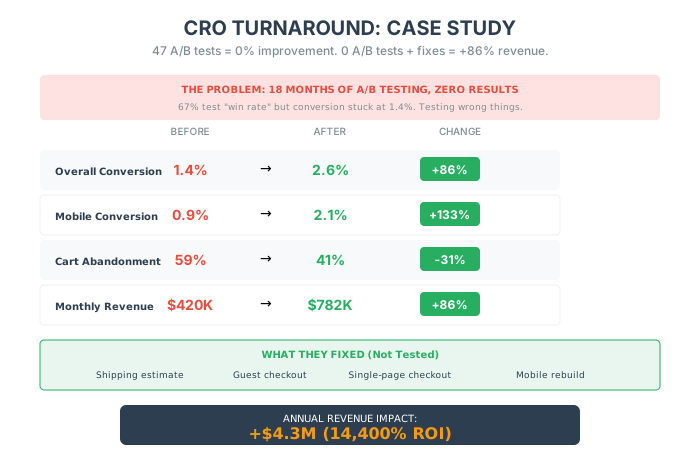
Let me show you what happens when you follow this framework instead of random testing.
The Situation
Section titled “The Situation”A home goods brand came to me frustrated. They’d been running A/B tests for 18 months. They had a “win rate” of 67%—meaning two-thirds of their tests showed positive results.
But their conversion rate? Flat. 1.4% for 18 straight months.
The problem: They were testing the wrong things.
The Detection Phase
Section titled “The Detection Phase”We ran the detection protocol:
Funnel Bleed Audit:
- Homepage → Product: 28% (🚨 Red flag: below 35%)
- Product → Cart: 4.2% (🚨 Red flag: below 5%)
- Cart → Checkout: 41% (🚨 Red flag: below 45%)
- Checkout → Purchase: 52% (OK)
Device Split:
- Desktop: 2.1%
- Mobile: 0.9% (🚨 Red flag: 43% of desktop)
Session Recordings (20 sessions):
- 14 showed shipping cost surprise at cart
- 8 showed zoom/image issues on mobile
- 6 showed confusion about product variants
The Intervention
Section titled “The Intervention”We stopped all A/B testing and focused on fixes.
Week 1-2 (Quick Fixes):
- Added shipping estimate to product pages
- Added trust badges to cart and checkout
- Enabled guest checkout
Week 3-6 (Medium Fixes):
- Rebuilt mobile product pages
- Implemented single-page checkout
- Added size guide overlays
Week 7-12 (Deep Fix):
- Built a personalization engine for homepage and email capture
The Results
Section titled “The Results”| Metric | Before | After | Change |
|---|---|---|---|
| Overall Conversion | 1.4% | 2.6% | +86% |
| Mobile Conversion | 0.9% | 2.1% | +133% |
| Cart Abandonment | 59% | 41% | -31% |
| Revenue (Monthly) | $420,000 | $782,000 | +86% |
Total revenue impact: +4.3M additional annual revenue**
Time invested: 12 weeks ROI: 14,400% in the first year
The Lesson
Section titled “The Lesson”They ran 47 A/B tests over 18 months and moved the needle zero.
We ran zero A/B tests over 12 weeks and nearly doubled revenue.
The difference? We fixed what was broken before we tested what was working.
Five things to do this week
Section titled “Five things to do this week”- Do the “Mobile Walk”: Pull out your phone. Buy your own product. If you have to pinch-to-zoom, if the keyboard covers the “Submit” button, or if you get annoyed… fix it. Stop testing button colors. Fix the broken stuff.
- Rewrite Your Hero: Look at your homepage. Does it answer “What is this?” and “Is it for me?” in 3 seconds? If not, rewrite the headline. “Premium Supplements” is bad. “Feel 10 Years Younger in 30 Days” is better.
- The Checkout Challenge: Switch to a generic Single-Page Checkout if you haven’t already. If you’re on Shopify, you’re probaby good. If you’re on a custom build, you’re probably losing money. Simplify it.
- Benefits Audit: Read your top product description. Highlight every feature in red. Highlight every benefit in green. If it’s mostly red, rewrite it. “100% Cotton” (Red). “Soft enough to sleep in” (Green).
- Email the Abandoners: Send a plain text email to everyone who abandoned cart yesterday. Subject: “Quick question.” Body: “Hey, saw you didn’t finish your order. Was it the price? Shipping? Something else? Just replying helps me fix it.” You will learn more from 5 replies than 50 A/B tests.