

Cognitive Load
The amount of mental effort required to use your product or website. Think of it like a battery. Every time a user has to read, decide, click, or search, it drains the battery. When the battery hits zero, they leave.
Reducing mental friction—because if you make your user think, you will be broke
— Albert EinsteinAny intelligent fool can make things bigger and more complex… It takes a touch of genius - and a lot of courage - to move in the opposite direction.
I was watching a screen recording of a user on a client’s website. Let’s call the client “Bob.”
Bob was burning $500 a day on ads. He had a great product. He had great pricing. He even had a great offer. But his conversion rate?
It was hovering at a pathetic 0.4%.
Bob was convinced his traffic was “low quality.” He thought the leads were trash. He blamed Facebook. He blamed the economy. He blamed his copywriter.
But as I watched this recording, I saw the truth.
The user—a guy named “Visitor #4829”—landed on the homepage. He scrolled down. He stopped. He scrolled up. He clicked a menu. He clicked back. He hovered over a “Learn More” button. He froze.
Then, click-click-click-click.
Rage clicks.
He was clicking on an image that looked like a button but wasn’t. Frustrated, he scrolled down again, got hit with a popup, closed it, got hit with a chat bot, closed it, and then…
Poof.
He closed the tab. Gone.
Bob didn’t have a traffic problem. Bob had a Cognitive UX problem.
Bob was trying to show everything to everyone all at once. And in doing so, he was showing nothing to anyone.
He was committing the cardinal sin of modern business: He was forcing his user to think.
And I’m going to tell you something that might hurt your feelings: If you make your user think, you will be broke.
Let me explain.
Cognitive Load
The amount of mental effort required to use your product or website. Think of it like a battery. Every time a user has to read, decide, click, or search, it drains the battery. When the battery hits zero, they leave.
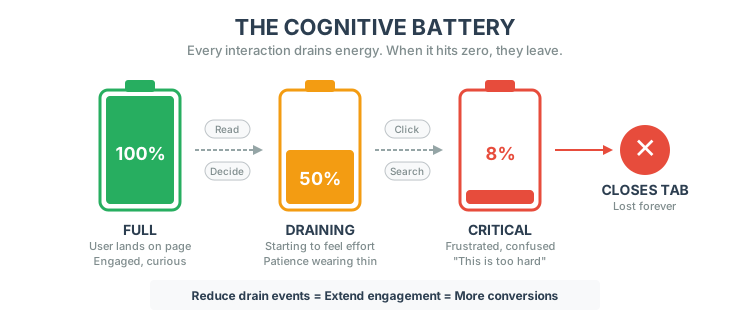
Here is the math that nobody does.
Let’s say you have a website.
“It’s just 3 seconds, Alex. Who cares?”
You should care.
Research shows that for every 1 second of additional load time or cognitive delay, conversion rates drop by 7% to 20%.
Let’s play that out.
If you are doing $10,000/month in sales:
That’s a brand new car. Poof. Gone. Because your menu was confusing.
If you are doing $1,000,000/month:
That’s a retirement fund. Poof. Gone.
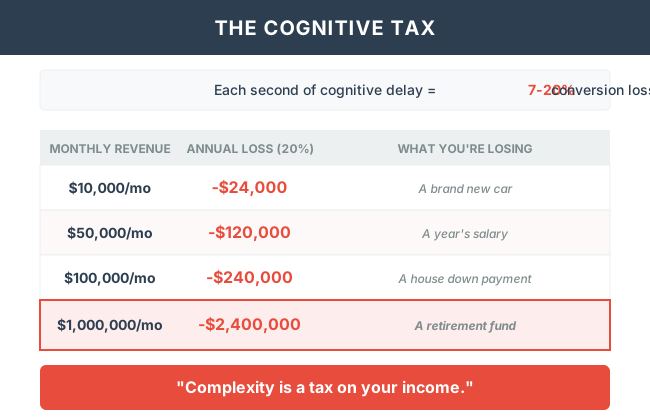
This isn’t theory. This is math. Complexity is a tax on your income.
Bob thought adding more options was “adding value.” He thought, “If I show them the 500 features we have, they’ll see how robust we are!”
Wrong.
He fell into the Data Density Trap.
Data Density
The amount of information presented in a single view.
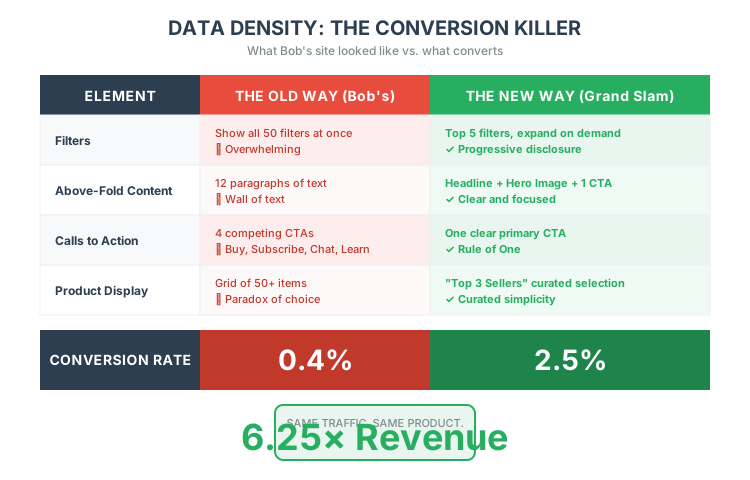
Here is what happens when you have High Data Density (the “Old Way”):
❌ The Old Way (Bob's Way)
Show all 50 filters at once.
12 paragraphs above the fold.
4 competing CTAs (Buy, Subscribe, Chat, Learn More).
Result: 0.4% Conversion.
✅ The New Way
Show only what’s necessary right now.
One clear Call to Action.
“Here are the top 3 sellers.”
Result: 2.5% Conversion (6x increase!)
The root cause of bad UX isn’t bad design skills. It’s narcissism.
Bob built his site for Bob. He organized it how he thinks about his inventory. He used jargon he understands.
He was forcing the user to adapt to him.
Imagine going on a first date. You sit down. Before the other person says “Hello,” you pull out a 50-page binder of your childhood photos, your medical history, your resume, and a list of your 30 favorite movies. You start reading it loud.
How long does that date last?
Minutes.
That is what your website is doing.
You must stop forcing users to adapt to your site. You must make your site adapt to your users. Don’t say “Look at all my cool stuff!” Say “I see you are looking for shoes. Here are the best shoes. Click here to buy.”
So, how do we fix this? How do we turn a “Bob” site into a money-printing machine?
We use the Simplicity Framework.
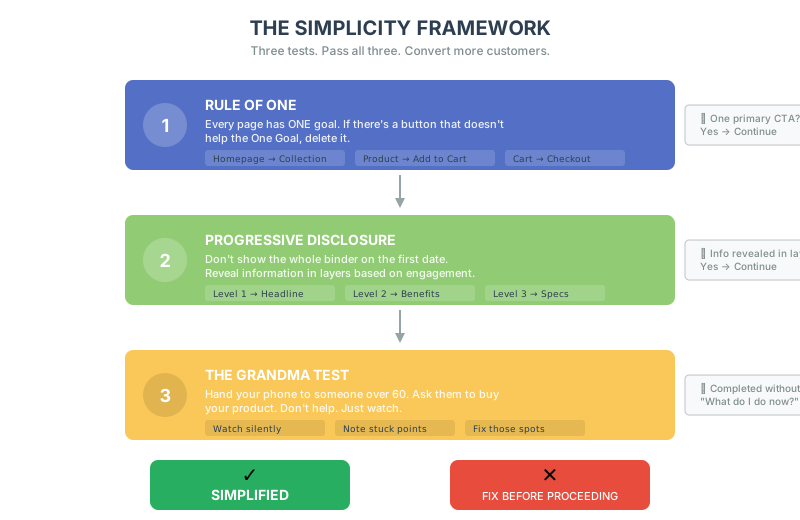
Every page has ONE goal. Delete anything that doesn't serve it.
Earn the scroll. Show only what's necessary right now.
If they ask 'What do I do now?', you've failed. Fix that spot.
Every page should have One Goal.
If there is a button on the page that does not help the One Goal, delete it. “But Alex, what about my Instagram feed widget?” Delete it. Are they there to look at your Instagram or buy your product?
Don’t show the whole binder on the first date.
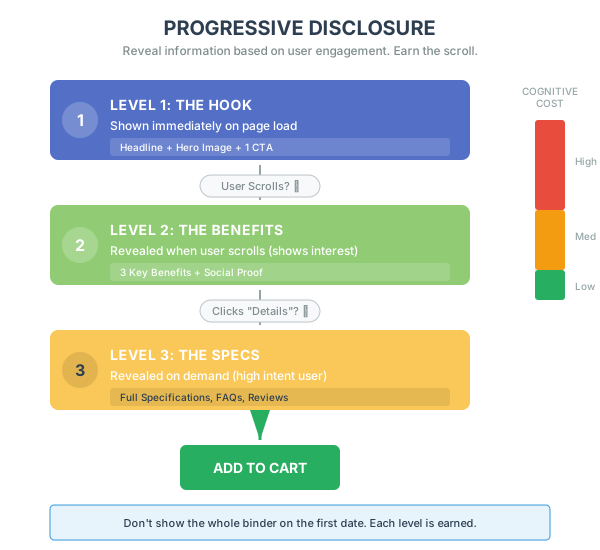
You are “earning the scroll.” You are respecting their battery.
Give your phone to your grandmother (or someone who is not tech-savvy). Ask them to buy a specific item.
You don’t win by being the smartest. You don’t win by having the most complex features.
You win by being the easiest to buy from.
We live in a world of infinite distraction. Your users are on a bus, holding a crying baby, with 5% battery, trying to buy your product. If you make them think, they will close the tab.
Remove the friction. Remove the clutter.
Respect the battery.
Simplicity scales. Complexity fails.
Save your users’ brain power for the only decision that matters: giving you money.
In the next chapter, we’re going to talk about how to take that simple experience and turn it into a habit that they can’t break.