

Checkout & Payments
The final mile
“If you don’t collect the money, you don’t have a business. You have a hobby.”
Unknown
Imagine you walk into a restaurant. You sit down. You order a steak, a glass of wine, and a dessert. The waiter brings it all out. It looks amazing. You pick up your fork. And then the waiter grabs your arm and says: “Before you eat, I need you to create an account, verify your email, and tell me your mother’s maiden name.”
What do you do? You leave.
70% of online shoppers do this every single day.
The average cart abandonment rate is 70%. That means for every 10 people who say “I want this,” 7 of them walk out the door because you made it too hard to pay.
The Checkout is not a form. The Checkout is the Goal Line. Do not fumble the ball.
Why They Bail: The Real Reasons
Section titled “Why They Bail: The Real Reasons”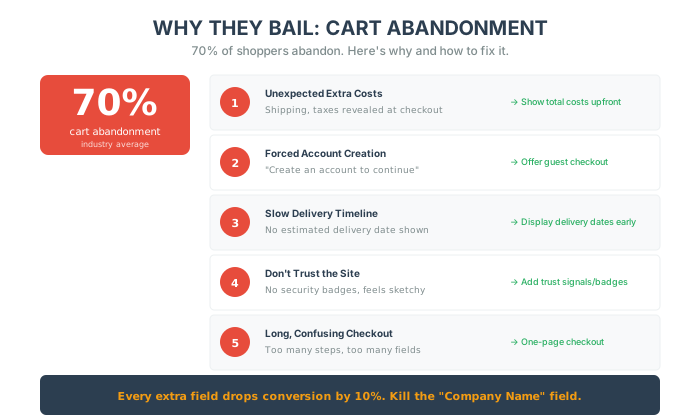
Before we fix anything, understand why shoppers leave:
| Abandonment Reason | How to Fix |
|---|---|
| Unexpected extra costs (shipping, taxes) | Show total costs upfront. No surprises. |
| Forced account creation | Offer guest checkout. Always. |
| Slow delivery timelines | Display estimated delivery dates early. |
| Not trusting the site | Add security badges and trust signals. |
| Long, confusing checkout | Streamline to as few steps as possible. |
One interesting note: a large portion of abandoners are just “window shopping” with zero intent to buy. For those, consider exit popups with incentives.
The Friction Audit: How to Close the Door
Section titled “The Friction Audit: How to Close the Door”Every extra field you ask them to fill out drops your conversion rate by 10%. Do you really need their phone number? Do you really need their “Company Name”? If the answer is no, kill it.
1. The “Guest Checkout” Mandate Forcing someone to create an account is the single fastest way to kill a sale. “But Alex, I want their data!” You know what’s better than data? Money. Let them check out as a guest. You can ask them to create an account after they pay.
2. The One-Page Rule Don’t make them click “Next” to see shipping. Don’t make them click “Next” to see taxes. Put it all on one page. Name, Address, Card, Pay. Boom. Done.
3. The Trust Layer
Beyond convenience, you need to build trust:
- Display visible security badges (SSL, Norton Verified)
- Show third-party trust badges (BBB, Trustpilot score)
- State explicit privacy and payment security guarantees
- Clearly display return/exchange policies
- Offer multiple payment methods (credit cards, PayPal, Apple Pay, Google Pay)
The Profit Multipliers (AOV)
Section titled “The Profit Multipliers (AOV)”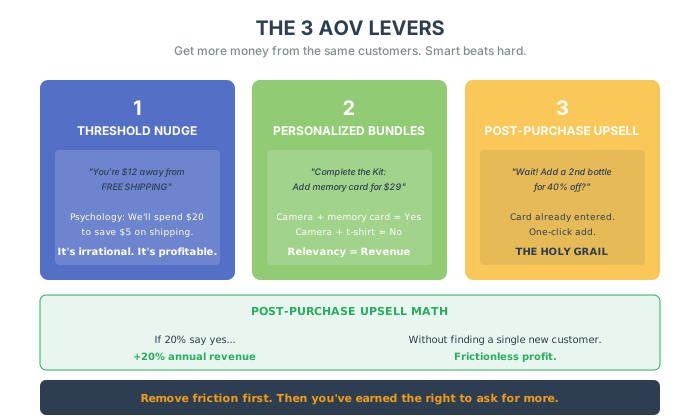
Once you have removed the friction, you have earned the right to ask for more. Most businesses try to get more customers. Smart businesses try to get more money from the same customers.
Here are the 3 Levers of AOV (Average Order Value):
1. The “Threshold” Nudge “You are 20 on a pair of socks we don’t need just to save $5 on shipping. It’s irrational. It’s profitable. Use it.
2. Personalized Bundles If they are buying a camera, don’t ask if they want a t-shirt. Ask if they want a memory card. “Complete the Kit: One-click add for $29.” Relevancy = Revenue.
3. The Post-Purchase Upsell (The Holy Grail) This is the secret weapon. After they put in their credit card and click “Pay,” the transaction is technically open for a few seconds. Show them a new offer. “Wait! Want to add a second bottle for 40% off?” They don’t have to re-enter their card. They just click “Yes.” It is frictionless profit. If 20% of people say yes, you just increased your annual revenue by 20% without finding a single new customer.
Buy Now, Pay Later (The Double-Edged Sword)
Section titled “Buy Now, Pay Later (The Double-Edged Sword)”Klarna. Afterpay. Affirm. Should you use them? Yes. They increase conversion on high-ticket items by 20-30%. But don’t offer it for a 100 to unlock interest-free payments.” Now you are driving AOV and Conversion.
Advanced AOV Tactics (That Nobody Talks About)
Section titled “Advanced AOV Tactics (That Nobody Talks About)”1. Dynamic Pricing Based on Behavior
Here’s something underutilized: adjusting offers based on real-time customer behavior.
If a customer lingers on your product page for longer than average, or adds multiple items but doesn’t check out, your system could offer a slight discount to nudge them over the line.
This isn’t about cutting margins. It’s about capturing hesitant buyers who would otherwise leave.
2. VIP Threshold Programs
Create exclusivity. Set up a VIP tier that unlocks only when a customer spends a certain amount.
“Spend $250 to unlock VIP status: Early access to sales. Free shipping for life. Personal account manager.”
This perceived exclusivity pushes customers to spend more per transaction to hit the threshold.
3. User-Generated Content at Checkout
Most brands use UGC on product pages. Smart brands use it at checkout.
Show Instagram photos, TikToks, or YouTube reviews right before the “Pay” button. When customers see real people loving your products, they’re more likely to:
- Complete the purchase
- Add extra items
- Feel confident they’re making the right decision
The checkout page isn’t just a form. It’s your last chance to convince them.
The Bottom Line
Section titled “The Bottom Line”Your checkout page is the most expensive real estate on your website. Treat it with respect.
- Kill the account requirement.
- Kill the extra fields.
- Add the upsells.
Make it easy for them to give you money.
Five things to do this week:
- Audit your checkout fields – How many are truly required? Cut the rest.
- Enable guest checkout – If it’s not on, turn it on today.
- Show total costs upfront – No surprises at the end.
- Add trust badges – Security seals, BBB, Trustpilot.
- Test a post-purchase upsell – Even a small one. Measure the results.
In the next chapter, we are going to look at Engineering Excellence—how to build a code culture that moves fast without breaking things.